
When building modern web interfaces, smooth animations and responsive interactions are critical for user experience. If you’ve ever used setTimeout or setInterval for animations and noticed jank, dropped frames, or input lag, it’s time to understand requestAnimationFrame (rAF).
This guide explains:
- What
requestAnimationFrameis and how it works requestAnimationFramevssetTimeout- A before/after performance comparison
- Framework usage (React, Vue)
- How rAF relates to Interaction to Next Paint (INP)
- When to use alternatives like
scheduler.yield,scheduler.postTask, orrequestIdleCallback
Understanding these concepts will help you improve animation performance.
What Is requestAnimationFrame?
requestAnimationFrame is a browser API designed specifically for visual updates. It tells the browser:
Run this callback right before the next repaint.
Instead of guessing timing (e.g., every 16ms), you align your work with the browser’s rendering pipeline.
requestAnimationFrame could be used for:
- Updating animations
- Moving elements
- Updating canvas drawings
- Breaking up visual work across frames
- Improving perceived responsiveness (e.g., INP)
It has excellent cross-browser support, is the standard for smooth animations, and ensures DOM updates happen right before the browser paints a new frame, reducing unnecessary layout work and helping animations stay smooth.
requestAnimationFrame lets you apply UI updates only when the browser is actually ready to display new content.
When does the requestAnimationFrame callback run?
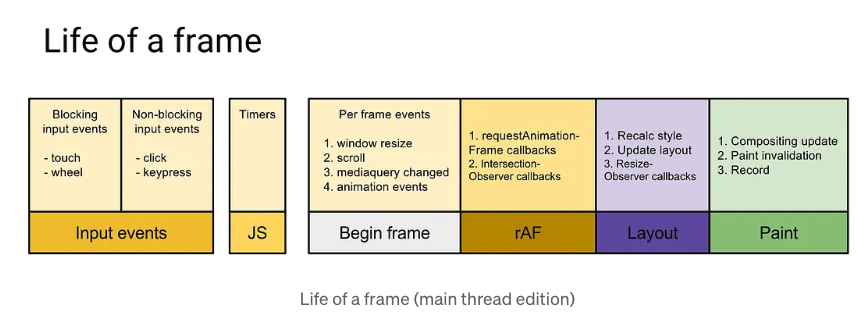
To understand how rAF works, let’s introduce a simplified mental model of the browser event loop:
- Handle user input
- Run queued tasks (e.g.,
setTimeout) - Run microtasks (e.g.,
Promise.then) - Run
requestAnimationFramecallbacks - Layout + paint
The important thing to note here is that requestAnimationFrame runs after tasks, but before layout and paint.
This means that DOM updates happen at the optimal moment, the browser can batch style and layout work efficiently, and you avoid unnecessary layout thrashing.
requestAnimationFrame vs setTimeout
Let’s compare these two functions with the simple animation examples to see how the code looks and compare their pros and cons.
First, we will look at the setTimeout example:
let position = 0;

function animate() {
  position += 2;
  box.style.left = position + "px";

  if (position < 300) {
    setTimeout(animate, 16);
  }
}

animate();
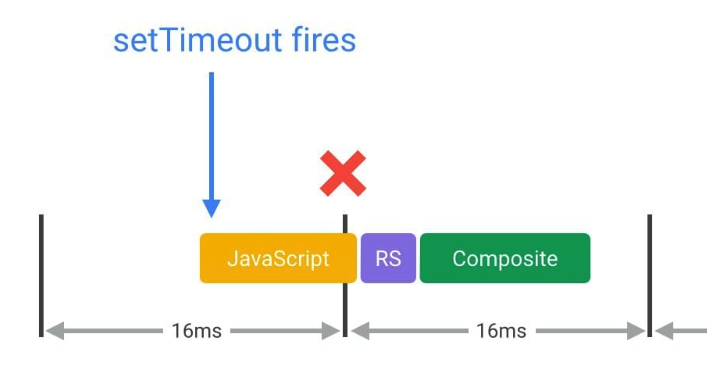
It’s very basic and works everywhere, but it simply queues a task at the back of the task queue. There are however a few problems with this solution like:
- Not synchronized with frame rate
- Can drift over time
- May fire too early or too late
- Competes with other tasks in the queue
- Can cause frame drops
This diagram from Google's web.dev website visualizes the scheduling issues with setTimeout:
On the other hand, the requestAnimationFrame code will look like the following:
let position = 0;
let lastTime = null;

function animate(time) {
  if (!lastTime) lastTime = time;

  const delta = time - lastTime;
  lastTime = time;

  const speed = 0.2; // pixels per ms
  position += delta * speed;

  box.style.left = position + "px";

  if (position < 300) {
    requestAnimationFrame(animate);
  }
}

requestAnimationFrame(animate);
requestAnimationFrame provides a timestamp parameter. Using this allows animations to be based on elapsed time rather than frame count, ensuring consistent motion even when frames take longer than expected.
It is synchronized with display refresh rate, automatically pauses in background tabs, runs at the correct point in the rendering pipeline, and is considered better for animation performance.
Paul Irish's article requestAnimationFrame Scheduling For Nerds explains in detail how requestAnimationFrame fits into the frame rendering lifecycle.
In performance recordings (e.g., Chrome DevTools), the rAF version typically shows:
- Fewer dropped frames
- More consistent frame timing
- Lower visual jitter
Framework-Specific Usage
Let’s take a look at how this requestAnimationFrame function could be used in React and Vue examples.
Using requestAnimationFrame in React with useEffect
In React, use rAF inside useEffect or custom hooks.
import { useEffect, useRef } from "react";

function useAnimation(callback) {
  const frame = useRef();

  useEffect(() => {
    const animate = () => {
      callback();
      frame.current = requestAnimationFrame(animate);
    };

    frame.current = requestAnimationFrame(animate);

    return () => cancelAnimationFrame(frame.current);
  }, [callback]);
}
While doing this, remember to cancel on unmount, avoid triggering React re-renders every frame unless necessary, and prefer mutating refs for high-frequency animation work.
Then in another place in a React application, we could use this hook like the following:
import { useRef } from "react";
import { useAnimation } from "./useAnimation";

function MovingBox() {
  const boxRef = useRef(null);
  const position = useRef(0);

  useAnimation(() => {
    position.current += 2;

    if (boxRef.current) {
      boxRef.current.style.transform = `translateX(${position.current}px)`;
    }
  });

  return <div ref={boxRef} className="box" />;
}
useRafFn in Vue with VueUse
In Vue, we would use one of the composables from the amazing VueUse library.
import { useRafFn } from "@vueuse/core";

useRafFn(() => {
  box.value.style.left = position + "px";
});
By doing so, the imported useRafFn will handle the cleanup, pause/resume, and reactive integration automatically for us.
requestAnimationFrame and Interaction to Next Paint (INP)
Interaction to Next Paint (INP) measures how quickly your app responds visually to user input. The important part here is that rAF callbacks can show up as presentation delay in INP.
Here's an example of an INP interaction from the maplibre library. The Long Animation Frames API reports that a script is invoked through a FrameRequestCallback.
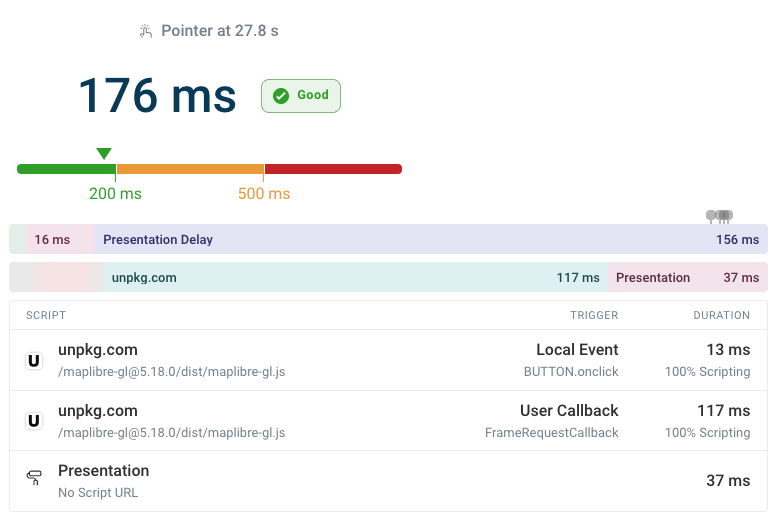
DebugBear can tell you how long it takes for the browser to process interactions, what are the scripts and triggers, and also what the duration of each INP component is.
The Powerful Pattern: rAF → setTimeout
You can call setTimeout from within the requestAnimationFrame callback to run tasks after an initial UI update.
button.addEventListener("click", () => {
  requestAnimationFrame(() => {
    setTimeout(() => {
      heavyWork();
    });
  });
});
rAF waits until the current frame is about to paint, then the paint happens, and finally setTimeout pushes work into the next frame. This guarantees a frame in between, improving INP because the visual response can paint before heavy logic runs.
This is especially useful when:
- You need to show loading UI immediately
- You need to update state visually before expensive work
- You want to reduce input latency metrics
Without this pattern, the browser may try to “squeeze” work into the current frame.
How rAF Compares to Other Scheduling APIs
Let’s compare common alternatives to requestAnimationFrame:
Promise.then(microtasks) - runs before the next task, has higher priority thansetTimeout, can block painting, and usually is not ideal for yielding to rendering.requestIdleCallback- runs during idle time, may never run before page unload, and is not reliable for critical UX work. It is good for non-critical background tasks.scheduler.yield- has excellent developer experience, preserves continuation, lets browser handle higher-priority tasks first. But it’s not supported by Safari.scheduler.postTask- more powerful version of yield that supports priorities and can cancel tasks.
Let’s combine all this knowledge and look at the table below that lists all these APIs, what they are best for and notes to take into consideration:
| API | Best For | Notes |
requestAnimationFrame | Visual updates | Best animation performance |
setTimeout | Basic deferral | Cross-browser, lowest common denominator |
requestIdleCallback | Background work | May never run |
scheduler.yield | Breaking up heavy tasks | Modern, great DX |
scheduler.postTask | Priority-based scheduling | Advanced use cases |
Promise.then | Microtask chaining | Not for yielding |
Summary
Use requestAnimationFrame for visual updates as it runs before paint and aligns with the rendering pipeline and produces smoother animations than setTimeout. For improving INP, consider the powerful rAF → setTimeout pattern to guarantee a paint between interaction and heavy logic.
For non-visual work, consider modern scheduling APIs like scheduler.yield.
If performance and UX matter — especially Core Web Vitals — understanding requestAnimationFrame is essential.
Monitor Core Web Vitals
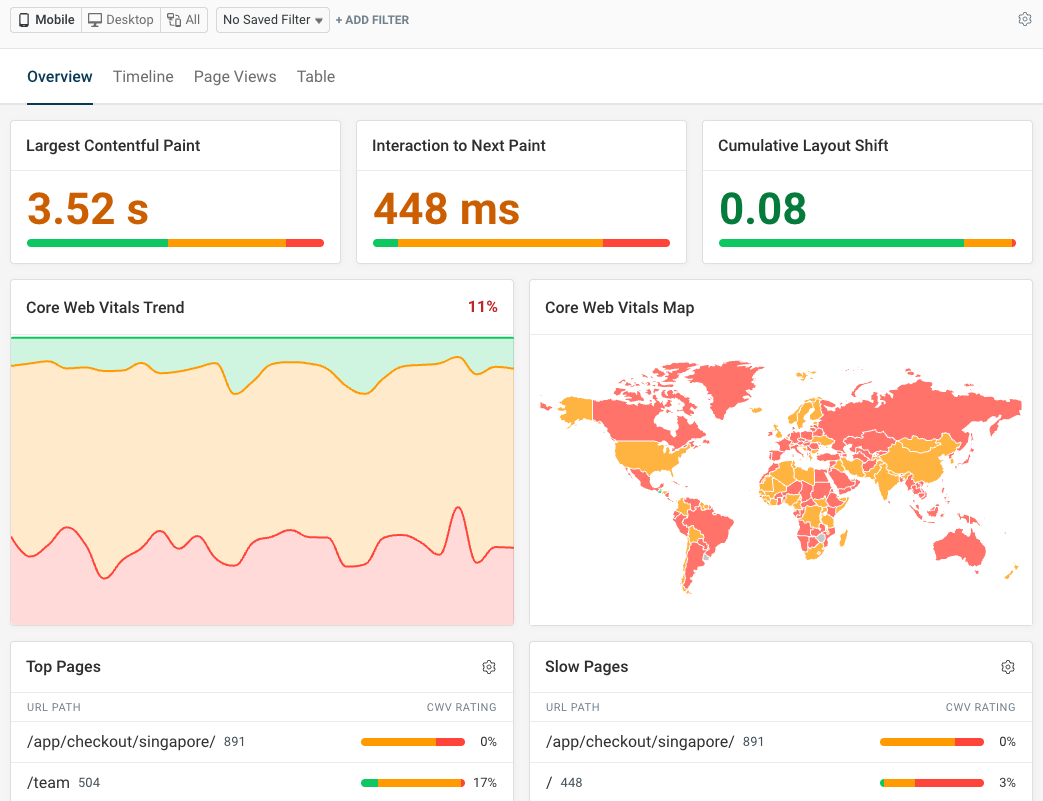
If you want to keep track of how using requestAnimationFrame and other optimizations affect your Core Web Vitals, you can use DebugBear to monitor your site’s performance.
It provides detailed insights into metrics like LCP, INP, and CLS, helping you identify bottlenecks and measure the impact of your changes. Sign up for a free trial to get started!


Monitor Page Speed & Core Web Vitals
DebugBear monitoring includes:
- In-depth Page Speed Reports
- Automated Recommendations
- Real User Analytics Data