
React Server Components (RSCs) introduce a server-first execution model where components that don't need interactivity are rendered exclusively on the server, while interactive parts remain Client Components.
Since RSCs are never included in the bundle, React apps can keep heavy dependencies off the client, fetch data closer to the source, and ship less JavaScript to the browser.
React Server Components became stable in React 19. In this post, we'll look into what RSCs are, how they work, when to use them, and what to watch out for.
What Are React Server Components?
RSCs are components that run on the server and never ship to the browser. They're ideal for rendering static content or displaying data fetched from an API or database — all without sending any of that logic to the client. They pass their rendered output to the client as a serialized payload (we'll see an example of this below), keeping them entirely out of your client bundle.
This makes React Server Components a natural fit for anything that fetches and displays data without needing interactivity, such as page layouts, blog posts pulled from a CMS, product listing pages, or a user profile that reads from a database.
You write Server Components the same way you write normal React components. You can use the same JSX and function syntax; there's no special API to learn. The difference is only in runtime constraints, not how the components are written.
You can't drop React Server Components into a plain React project; they require framework support. Here's what we have as of the time of writing:
- Next.js App Router is the most production-ready and mature RSC implementation available today.
- React Router v7 has RSC support in active development — an early, unstable version is available to try in v7.9.2, but it's not yet recommended for production.
- Waku is a lightweight React framework built around RSCs that recently hit 1.0 alpha — worth watching, but still not recommended for production use.
RSC vs. SSR
React Server Components are often confused with server-side rendering (SSR), but they solve different problems:
- SSR renders your full component tree to HTML on the server for the initial request, but it still ships JavaScript to the client to hydrate the page.
- RSCs go further by keeping the component code on the server entirely — none of it is ever sent to the client.
Note that React Server Components alone don't produce HTML. Pairing them with SSR or static rendering (a.k.a. static site generation or SSG) is what delivers fully rendered HTML to the browser. RSCs can be used with or without SSR. In practice, most frameworks (e.g., Next.js App Router) combine the two.
React Server vs. Client Components
Client Components are the traditional React components that run in the browser and can use client-side features, such as useState, useEffect, event handlers, and browser APIs. Server Components run on the server, where each render starts from scratch. They can't use client-side hooks or browser APIs, and no state is carried over between requests.
In apps that use RSCs, everything is rendered on the server by default. However, you can mark any component as a Client Component by adding the 'use client' directive at the top of its file. This creates a server-client boundary below which everything in the module graph also becomes a Client Component.
Client and Server Components work together, but with a key constraint: Client Components can't import Server Components since everything imported below a 'use client' directive goes into the client bundle, and RSC code can't run in the browser.
If you need a Server Component to render inside a Client Component, another Server Component higher in the component tree must import and pass it down as children or another prop. For example, here, Page imports Cart so it can appear inside Modal, which is a Client Component:
// Page.jsx (Server Component)
import Modal from "./Modal";
import Cart from "./Cart";

export default function Page() {
  return (
    <Modal>
      <Cart /> {/* Still a Server Component */}
    </Modal>
  );
}
// Modal.jsx (Client Component)
"use client";

import { useState } from "react";

export default function Modal({ children }) {
  const [open, setOpen] = useState(true);
  return open ? <div>{children}</div> : null;
}
How the RSC Payload and Flight Protocol Work
React serializes Server Components into an intermediate, streamable format called the Flight protocol. Rather than HTML, this payload is a compact representation of the Server Component tree that describes what to render without shipping the Server Component code itself. It includes:
- the rendered output of Server Components
- references to the required Client Component bundles
- props passed from Server Components to Client Components
The browser uses this payload to reconstruct and render the component tree for the initial load. Subsequent navigations may also request a new server-generated RSC payload if the route or its data can't be served from cache.
Props passed from Server Components to Client Components are serialized into the RSC payload and visible to anyone inspecting network traffic. Always treat props as public data and never pass sensitive information such as API keys or credentials across the server-client boundary.
You can see what an RSC payload looks like in the Network tab of Chrome DevTools. To do so, filter for Fetch/XHR requests, click a request with rsc in its name, and open the Response tab. Here's an example from Vercel's homepage:

Pros of React Server Components
The main advantages of using RSCs are smaller bundles, simpler data fetching, and potentially better Largest Contentful Paint results and search engine rankings:
Smaller JavaScript Bundles
As React Server Component code never reaches the browser, any libraries it uses stay server-side, too. While bundle size savings vary significantly depending on your application architecture and how many dependencies you can move server-side, the potential for meaningful reductions is real.
Faster Data Fetching
Server Components fetch data directly with async/await, which replaces the useEffect and useState boilerplate used in client-side fetches. This results in simpler code and typically lower latency (however, serverless cold starts or deploying to edge locations far from your database can offset the latter).
(Potentially) Better LCP
RSCs may improve Largest Contentful Paint (LCP) in two ways:
- Less JavaScript on the client means the browser has less code to download, parse, and run on initial page load.
- When RSCs are used with React Suspense, streaming lets the server send meaningful UI immediately rather than waiting for all data to be ready. This is a frequent pattern for optimizing performance on content-heavy pages.
Note that the bigger performance gains come from adopting streaming and Suspense. RSCs make it possible to improve LCP, but don't guarantee it.
Better SEO
Paired with SSR or static rendering, React Server Components deliver fully rendered content in the initial HTTP response, which is immediately available to search engine crawlers without client-side JavaScript execution.
Cons of React Server Components
RSCs come with a couple of disadvantages, too — most importantly, serious security risks, but they also make the codebase more complex and harder to debug:
Server-Side Attack Surface
The Flight protocol's deserialization mechanism introduces an attack surface specific to React Server Components, and has already produced a cluster of security vulnerabilities in quick succession:
- React2Shell (CVE-2025-55182) – a maximum severity (CVSS 10.0) remote code execution vulnerability, patched in React 19.0.1, 19.1.2, and 19.2.1
- Denial of Service and Source Code Exposure – follow-on vulnerabilities discovered by researchers probing the same codebase after React2Shell, patched in React 19.0.4, 19.1.5, and 19.2.4
Whether these issues stem from the immaturity of the RSC ecosystem or from deeper architectural characteristics of the Flight protocol remains to be seen, but security is clearly the biggest challenge facing RSCs today.
If you use RSCs, make sure you keep React and its dependencies up to date and follow the React blog for the latest security news.
Caching Behavior Is Complex and Framework-Dependent
Since RSCs have no built-in caching standard, caching is entirely delegated to the framework. This means you need a solid understanding of your framework's specific caching model, including when a Server Component's output is cached, when it's revalidated, when it triggers a fresh server render, etc. (see Next.js's complex caching model as an example).
Caching rules don't just vary between frameworks but can also change between major versions of the same framework (e.g., Next.js 14 vs. 15).
Debugging Is Harder
Errors that span the server-client boundary are harder to debug, as stack traces may be split between server and browser logs and the RSC payload isn't easily human-readable. Tooling is catching up, with Next.js 16 introducing DevTools MCP for AI-assisted debugging and React adding Performance Tracks with RSC visibility to Chrome DevTools, but debugging isn't as seamless as with traditional React.
Third-Party Library Compatibility Is Inconsistent
Many popular React libraries, such as animation libraries or UI component kits, assume they run in a browser and can rely on useEffect or browser-only APIs, which makes them incompatible with Server Components. While more libraries are adding explicit RSC support, third-party compatibility remains inconsistent.
When to Use React Server Components
RSCs are a good fit for content-heavy applications where most of the UI is data-driven but not highly interactive, such as:
- blogs, news sites, and landing pages
- documentation sites
- eCommerce product pages
However, avoid React Server Components for highly interactive applications, such as:
- rich text editors
- real-time collaborative tools
- anything relying on frequent local state updates, such as drag-and-drop interactions
If you're using Next.js App Router, the decision is already made for you since RSCs are the default and the architecture is built around them.
Start Monitoring Your React App
In theory, React Server Components can speed up your app and improve your LCP results, but to see how they perform in practice, you'll want to measure real-world impact.
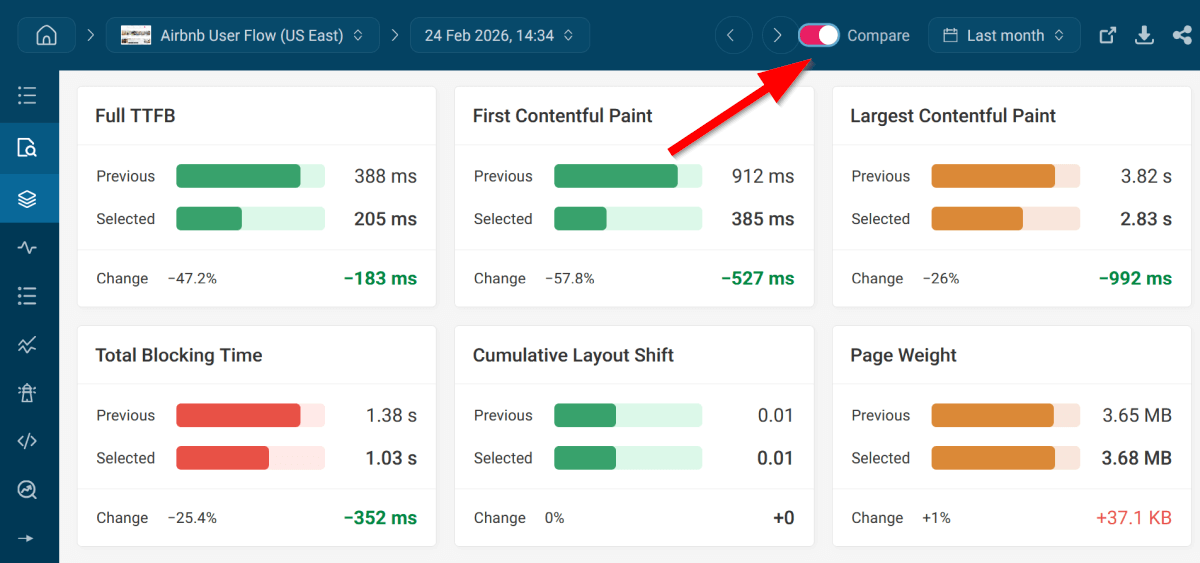
With DebugBear, you can set up automated lab tests and compare your app's detailed performance metrics before and after adopting RSCs (or any other new feature):
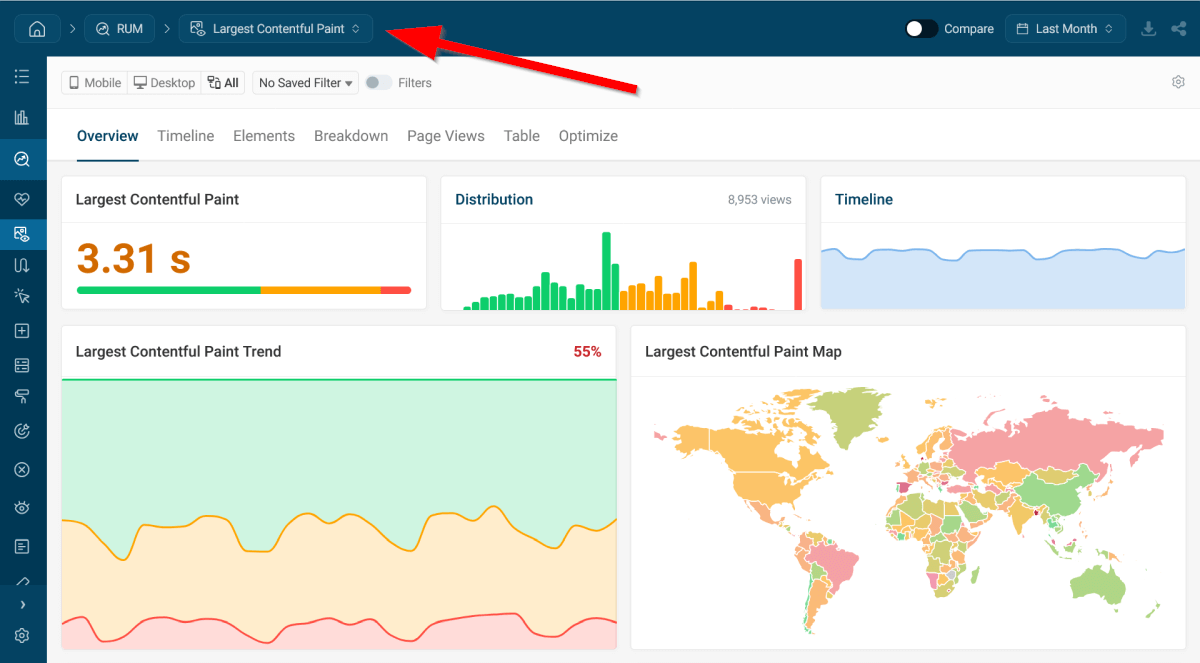
You can also see how LCP and other Web Vitals improve or degrade for your real users over time by using our real user monitoring (RUM) feature:
To see how your web performance metrics change as you adopt React Server Components, sign up for our free 14-day trial and start monitoring your application.


Monitor Page Speed & Core Web Vitals
DebugBear monitoring includes:
- In-depth Page Speed Reports
- Automated Recommendations
- Real User Analytics Data