
A Content Delivery Network (CDN) helps deliver your site's content faster and more reliably to users around the world.
In this article, we'll break down how a CDN works, what advantages it offers for SEO, and how to set one up using Cloudflare.
What Is a Content Delivery Network (CDN)?
A Content Delivery Network is a network of servers distributed across different geographic locations that work together to deliver website content more quickly to users. Instead of every visitor requesting data from a single origin server, a CDN caches and serves content such as images, stylesheets, and scripts from a server that is physically closer to the user. This reduces latency, improves load times, and creates a more consistent experience regardless of where the user is located.
Beyond speed, CDNs also help improve reliability and performance under heavy traffic. By distributing requests across multiple servers, they reduce the load on the origin server and can handle sudden spikes in demand more effectively.
There are many different CDNs you can choose from. Along with serving content, many of these tools offer additional services such as caching optimization, image and video compression, DDoS (distributed denial-of-service) protection, bot mitigation, and performance analytics. These features help improve your site's speed, security, and reliability.
Here's a list of popular CDN providers:
Later on in this article, we will take a look at setting up a CDN with Cloudflare.

What are the SEO benefits of using a CDN?
While using a CDN doesn't directly boost rankings, it improves underlying factors that search engines care about, particularly performance, reliability, and crawl efficiency. Let's take a look at some of the benefits.
Improved Core Web Vitals
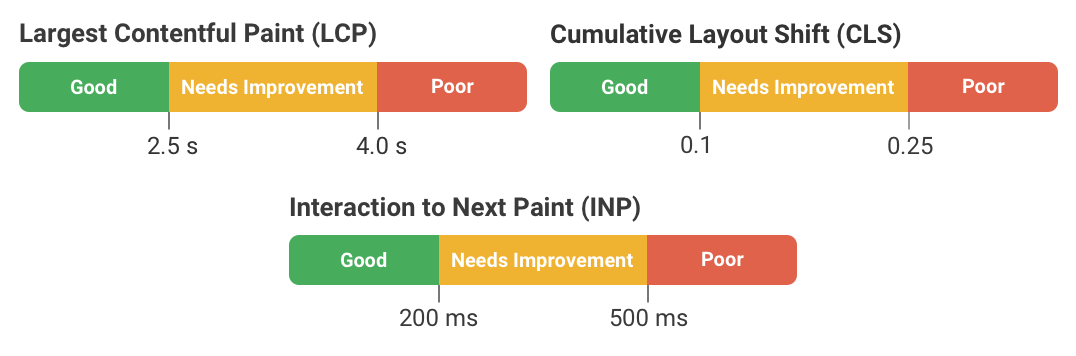
Google Core Web Vitals (CWV) are a set of user experience metrics that Google uses to evaluate how real users experience a page. There are three Core Web Vitals metrics, each one measuring a different aspect of user experience:
- Largest Contentful Paint (LCP): measures how quickly the main content of a page becomes visible to users.
- Cumulative Layout Shift (CLS): measures how much the page layout unexpectedly shifts while loading.
- Interaction to Next Paint (INP): measures how responsive a page is to user interactions.
Using a CDN can significantly improve delivery speed for larger assets like images, stylesheets, and JavaScript requests. By serving these resources from edge locations closer to the user, a CDN helps reduce latency and improve loading times, which can positively impact LCP in particular.
Core Web Vitals are part of Google's page experience signals, meaning that making sure these metrics are in the good range can contribute to stronger SEO performance when competing pages are otherwise similar.
Faster Page Load Times
Improving Core Web Vitals should lead to a faster experience overall. Page speed plays a critical role in how visitors interact with your website. Slower pages often lead to higher bounce rates, shorter session durations, and lower overall engagement.
One of the most noticeable improvements is to Time to First Byte (TTFB), which measures how long it takes for the browser to receive the first byte of data from the server. By serving cached responses from an edge server instead of routing every request back to the origin, a CDN can dramatically reduce TTFB. This is especially beneficial for users located far from where the site is hosted. TTFB is also one of the LCP sub-parts, meaning a faster TTFB could lead to an improved LCP score.
While bounce rates are not direct ranking factors, they are closely tied to overall site quality and performance, which search engines typically favor. Faster pages create a smoother experience, increasing the likelihood that users stay on your site and interact with your content.
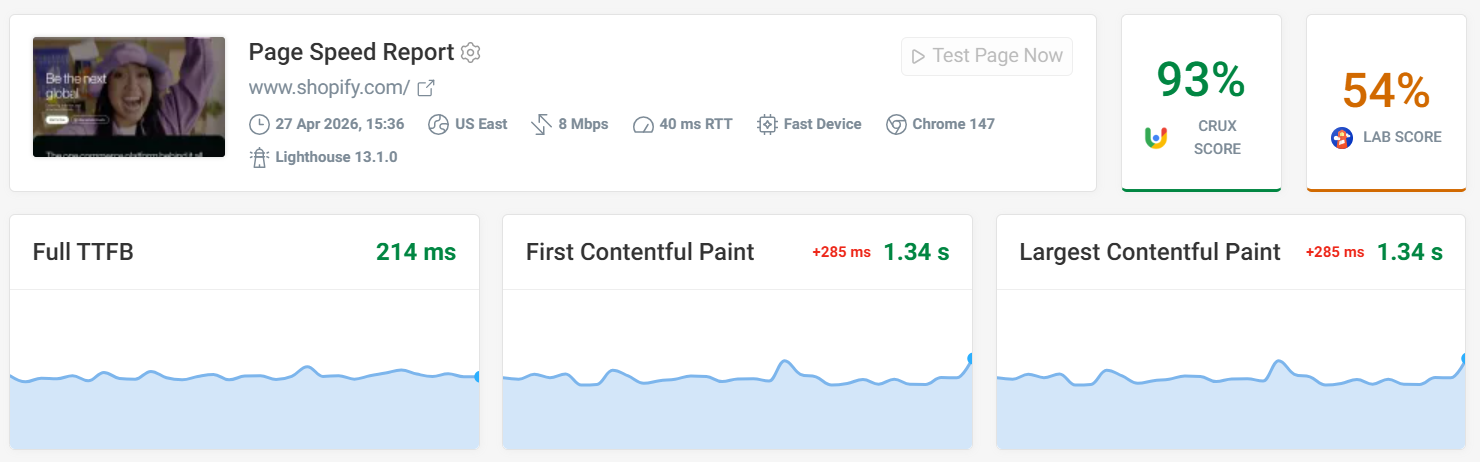
Shopify is a great example of optimizing page load times and LCP, which you can view on our demo project. The screenshot below shows how quickly Shopify's pages load, with strong Core Web Vitals scores across the board.
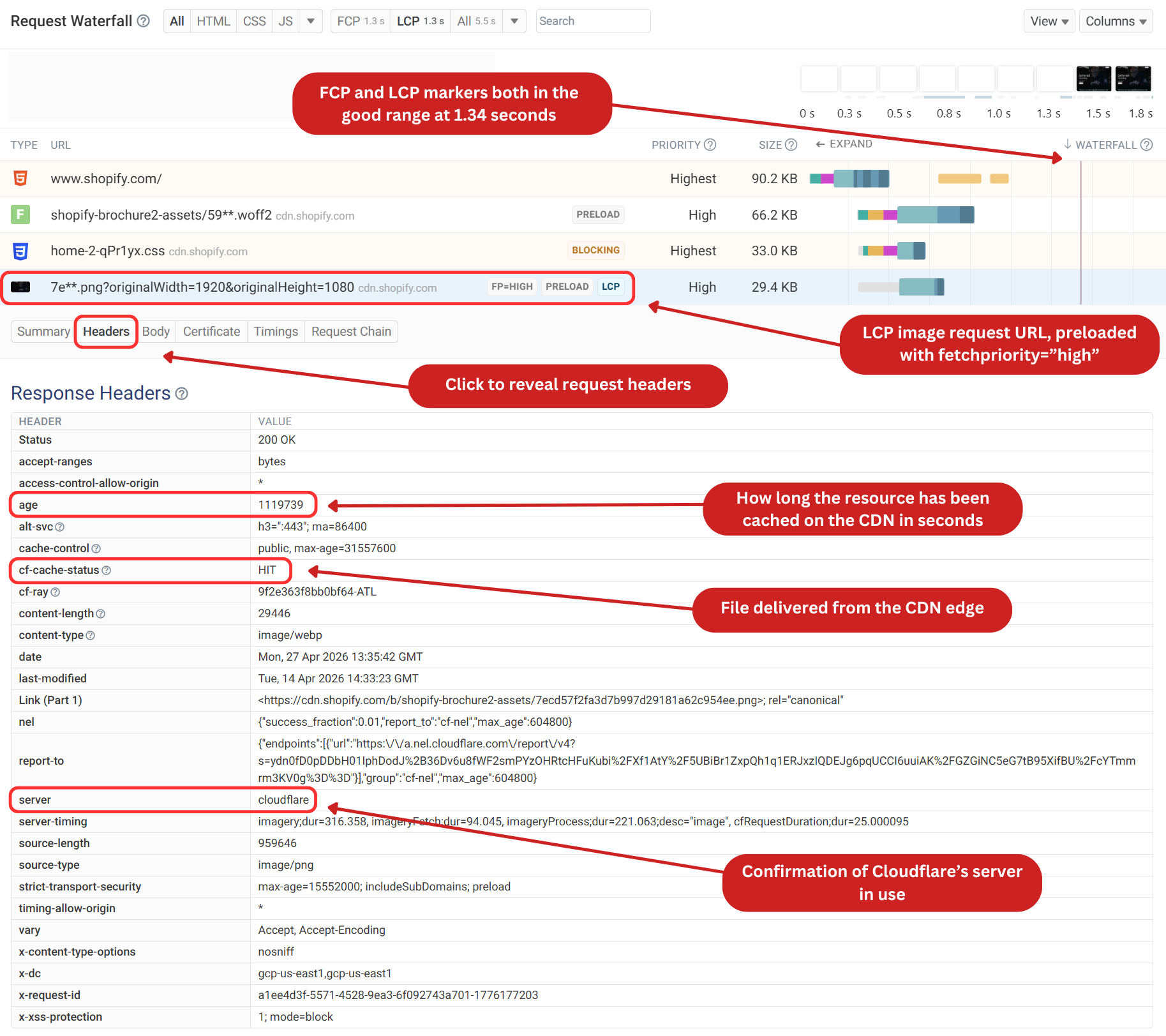
The LCP image is requested early with high priority and is served from cdn.shopify.com. When clicking into the request, we can open up the headers tab for more information. The response headers show Cloudflare as the server and cf-cache-status: HIT, meaning the image is served directly from an edge cache rather than the origin server.
The age value shows the asset has been cached for a long time, reducing the need for repeated origin requests.
Better Crawling and Indexing
Another important factor related to page speed is that a faster website is more crawlable. If your site responds slowly or experiences delays, search engine bots may crawl fewer pages. This can limit how quickly new or updated content is discovered and indexed.
Reducing server response times helps address this issue. Faster responses mean bots can retrieve more pages in less time, making crawling more efficient. This is particularly important for larger websites or those that publish content frequently, such as news publishers or e-commerce websites. With a CDN serving content to your website, newer content has a better chance of being crawled and becoming more visible in search results.
Improved Reliability and Uptime
If your website is unavailable or slow to respond when search engines attempt to crawl it, those opportunities can be missed. CDNs improve uptime by distributing traffic across a network of servers, reducing the load on a single origin server.
They can also absorb traffic spikes, such as those experienced by a news website during a major global story or an e-commerce site during a holiday season.
This ensures that both users and search engine bots can access your site consistently. Over time, this stability supports better crawl coverage and helps maintain your site's presence in search results, particularly during periods of high demand.
How to set up a CDN for your website
Setting up a CDN is not a complicated process. Most services can be set up quickly, with minimal configuration required. Let's take a look at the process for Cloudflare.
Create a Cloudflare account
Head to Cloudflare's website and sign up for a free account. The free plan includes CDN functionality and is sufficient for most websites to get started.
Add your domain and update nameservers
Add your website to Cloudflare and let it scan your existing DNS records. This imports your current setup so traffic can be routed through Cloudflare's network without breaking anything. Once complete, you'll be given new nameservers to update at your domain registrar. This ensures that incoming requests are handled by Cloudflare's edge network instead of going directly to your origin server.
Configure proxying and caching
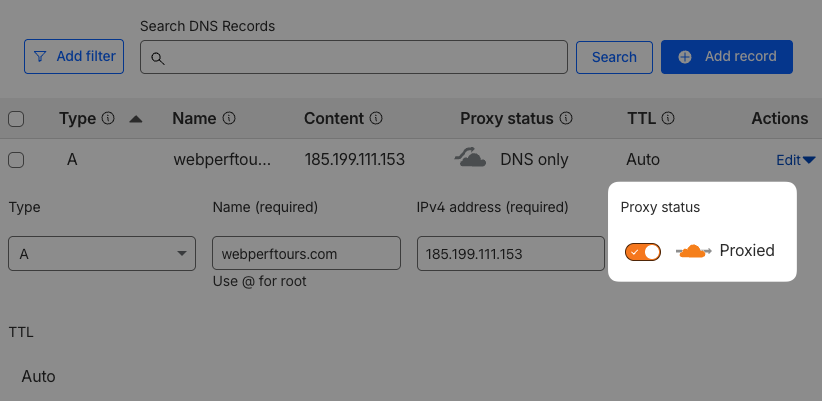
In your DNS settings, enable proxying (the "orange cloud") to tell Cloudflare to cache and serve content from its global edge locations. Cloudflare will automatically cache static assets like images, CSS, and JavaScript. You can fine-tune this behavior by adjusting cache settings, such as how long files are stored at the edge or which content types should always be cached.
Wait for DNS propagation
DNS changes typically propagate within a few hours, though it can take up to 24 hours in some cases. Once complete, your CDN is active and visitors will be served content from the nearest edge location.
Verifying your CDN setup
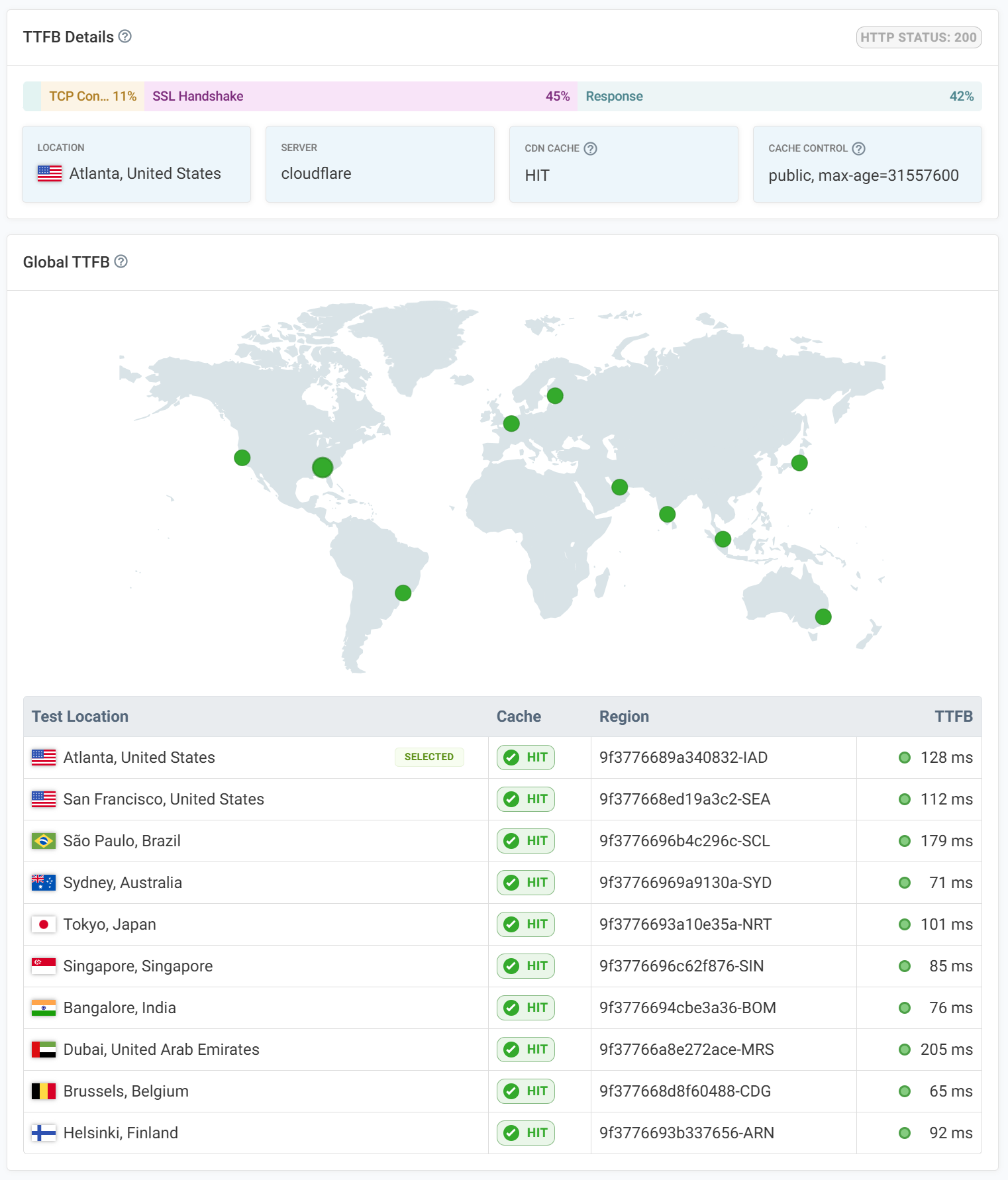
Once your CDN is configured, you'll want to confirm that assets are actually being served from the edge. We have a free CDN testing tool that lets you quickly verify whether your content is being served from a CDN. The test runs from 10 different locations, showing the TTFB score, cache status, and CDN provider.
In this example, I tested the LCP image from the Shopify website. The results confirm that the asset is being served through Cloudflare's CDN, with a cache status of HIT across all test locations. A "HIT" status means the image is being delivered directly from the CDN edge cache, rather than the origin server, which is exactly what you want to see.
Conclusion
A CDN won't directly improve your search rankings, but it strengthens the performance signals that search engines use to evaluate your site. Faster load times, improved Core Web Vitals, better uptime, and more efficient crawling all contribute to a stronger foundation for SEO.
Setting up a CDN is straightforward with providers like Cloudflare, and the benefits extend beyond SEO to include a better experience for your users. If you're looking to improve both performance and search visibility, adding a CDN is a practical step worth considering.
Want to find out if your website could benefit from a CDN? Run a free performance test with DebugBear to analyze your page performance.


Monitor Page Speed & Core Web Vitals
DebugBear monitoring includes:
- In-depth Page Speed Reports
- Automated Recommendations
- Real User Analytics Data