
React Compiler is Meta's latest attempt to improve React performance. It's a build-time optimization tool for React apps that automatically memoizes (caches) parts of your code.
The promise is you can forget about manual memoization by installing React Compiler, which handles it all during the build process ✨. This, ideally, means your code becomes cleaner and more readable, unnecessary re-renders are eliminated, and Interaction to Next Paint (INP) improves.
React Compiler, previously known as React Forget, became stable in October 2025 after years of development. In this post, we'll look into what it looks like in practice.
What Is React Compiler?
By default, React re-renders components whenever their state changes or their parent re-renders. These re-renders cascade down the component tree (i.e., when a parent re-renders, all their children re-render by default, even if their own props haven't changed).
With proper memoization, you can prevent unnecessary re-renders. Memoization caches the result of a computation or component render so it can be reused when its inputs haven't changed. With manual memoization, you can prevent unnecessary re-renders by memoizing:
- components, using
React.memo - values, using
useMemo - function references, using
useCallback
However, manual memoization clutters code, requires constant maintenance, and is prone to errors. This is where React Compiler comes into the picture by analyzing your code at build time and automatically adding memoization to eligible code.
Getting Started with React Compiler
React Compiler is implemented as a Babel plugin, which allows it to integrate with various build tools, including Vite, Next.js, and Rsbuild.
With React Compiler, memoization happens automatically during the build with no configuration required.
While React Compiler is optimized for React 19, you can also use it with React 17 and 18.
React Compiler and ESLint
React Compiler uses static analysis and assumes components adhere to the Rules of React, which ensure predictable behavior across renders. As code that violates these rules may not be optimized, it's recommended that you use ESLint to catch violations.
To do so, you can use the eslint-plugin-react-hooks plugin with either the recommended or recommended-latest preset, which includes compiler-specific lint rules.
How to Install React Compiler with Vite
Since React Compiler is now fully integrated with Vite's React setup, you can simply run the following command:
npm create vite@latest my-react-app
Then, you can select it from the options (you can install it with either JavaScript or TypeScript):
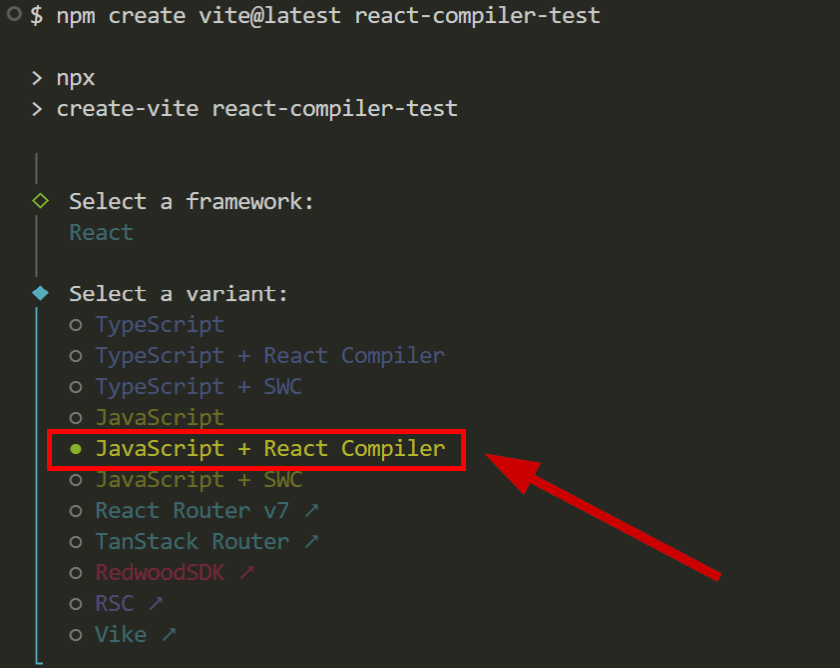
Vite also adds the ESLint plugin and configures the eslint.config.js file so you don't need to add it separately.
For specific setup instructions for other build tools, check out the official installation guide.
How to Test React Compiler
You can use React Developer Tools (v5.0+) to verify that the compiler is working. Memoized components display a Memo ✨ badge, which appears for both manually memoized components and those automatically optimized by React Compiler.
This is how it appears in the Components tab:
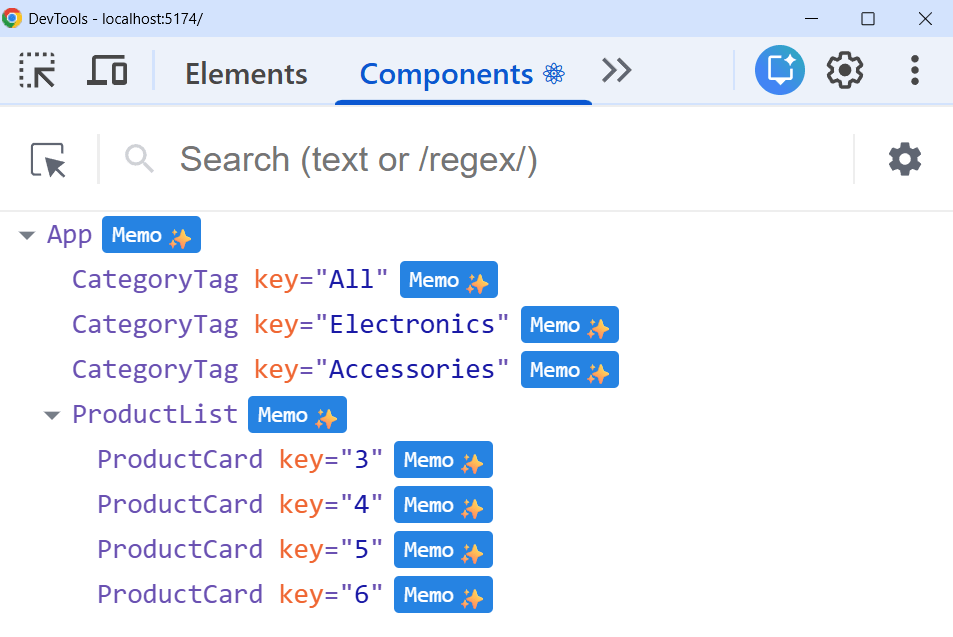
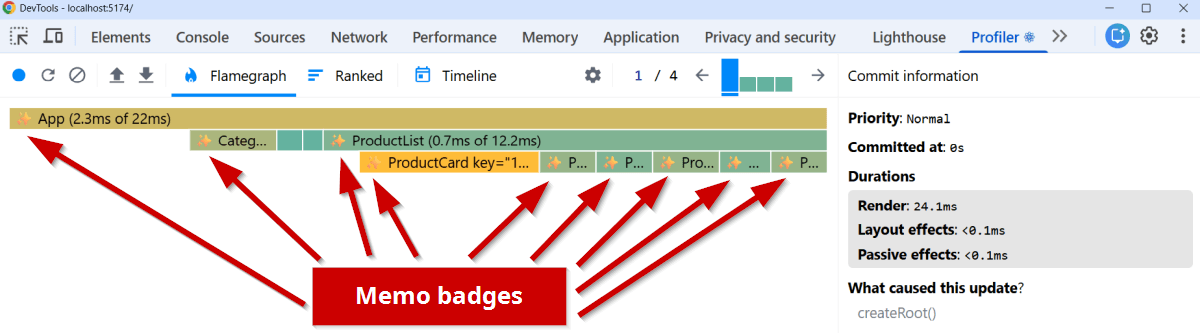
You can also see the Memo ✨ badges in React Developer Tools' Profiler tab.
The example below shows the compiler's effect across subsequent commits in a profiling session. Here is the initial commit:
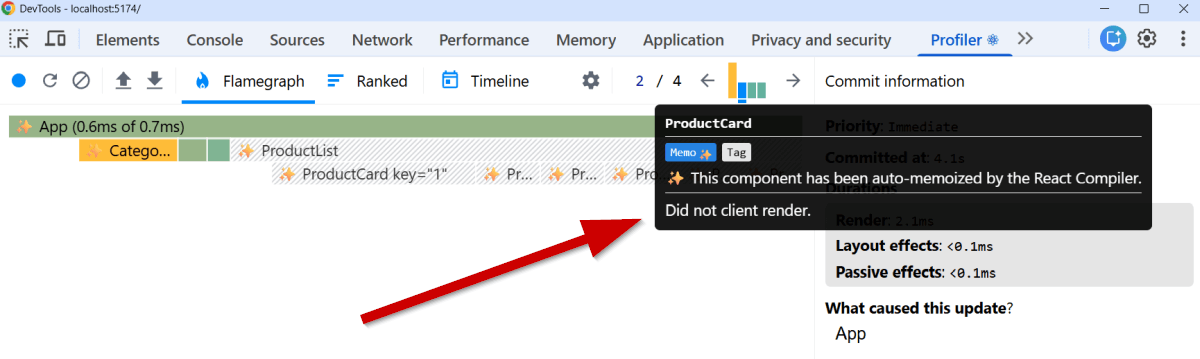
In the second commit, however, unchanged child components were skipped and appear greyed out in the Profiler.
Hovering over them also displays a tooltip that confirms both the compiler's auto-memoization and that the component didn't re-render:
How Does React Compiler Work?
React Compiler doesn't use React.memo, useMemo, and useCallback. Instead, it automatically inserts memoization logic at compile time, which caches render output at a more granular level than these explicit APIs. You can see this in action using the React Compiler Playground, which shows the compiler's output.
For example, take the following component:
function ProductCard({ product, onBuy }) {
  return (
    <div>
      <h2>{product.name}</h2>
      <Price value={product.price * 0.9} />
      <button onClick={onBuy}>Buy</button>
    </div>
  );
}
This is how you would memoize it manually:
import { memo } from "react";

const ProductCard = memo(function ProductCard({ product, onBuy }) {
  return (
    <div>
      <h2>{product.name}</h2>
      <Price value={product.price * 0.9} />
      <button onClick={onBuy}>Buy</button>
    </div>
  );
});
And, this is how React Compiler memoizes the same component:
import { c as _c } from "react/compiler-runtime";
function ProductCard(t0) {
  const $ = _c(10);
  const { product, onBuy } = t0;
  let t1;
  if ($[0] !== product.name) {
    t1 = <h2>{product.name}</h2>;
    $[0] = product.name;
    $[1] = t1;
  } else {
    t1 = $[1];
  }
  const t2 = product.price * 0.9;
  let t3;
  if ($[2] !== t2) {
    t3 = <Price value={t2} />;
    $[2] = t2;
    $[3] = t3;
  } else {
    t3 = $[3];
  }
  let t4;
  if ($[4] !== onBuy) {
    t4 = <button onClick={onBuy}>Buy</button>;
    $[4] = onBuy;
    $[5] = t4;
  } else {
    t4 = $[5];
  }
  let t5;
  if ($[6] !== t1 || $[7] !== t3 || $[8] !== t4) {
    t5 = (
      <div>
        {t1}
        {t3}
        {t4}
      </div>
    );
    $[6] = t1;
    $[7] = t3;
    $[8] = t4;
    $[9] = t5;
  } else {
    t5 = $[9];
  }
  return t5;
}
As you can see above, the compiler memoizes each JSX element independently rather than memoizing the component as a whole. The <h2>, <Price>, <button>, and even the wrapping <div> are all cached separately and only re-created when their specific inputs change.
Pros of React Compiler
While React Compiler is still very new, and it will take more time and data to fully evaluate, here are some advantages that are already apparent:
Cleaner Code
With React Compiler, your source code will be cleaner, more readable, and more maintainable. Instead of cluttering your components with memoization wrappers, you write straightforward React code and let the compiler handle the rest.
Granular Optimization
As we saw above, React Compiler can memoize more granularly than humans typically do. Instead of wrapping entire components, it can memoize individual JSX elements and calculations within components.
Eliminates Manual Memoization Issues
Manual memoization requires careful attention to detail. It's easy to accidentally create new object references in dependency arrays or break memoization by forgetting to wrap callbacks passed to child components. React Compiler eliminates these pitfalls by handling optimizations.
Some Production Successes
React Compiler's announcement post by Lauren Tan, Joe Savona, and Mofei Zhang cites some production successes:
- Meta successfully deployed it to Instagram and Quest Store. Instagram saw an average 3% improvement across all pages, Quest Store improved loads by at least 4%, some interactions became more than 2× faster, and initial loads improved by up to 12% (see Mofei Zhang's talk at React Conf 2024).
- Sanity Studio achieved 20-30% better rendering performance (see Cody Olsen's case study).
- Wakelet reported 10% LCP improvements and 15% INP improvement, with pure React components seeing INP gains closer to 30% (see Nick Blow's case study).
Cons of React Compiler
Now, let's see React Compiler's main disadvantages, too:
The Misleading Memo ✨ Badge
As I mentioned above, React Developer Tools shows Memo ✨ badges on compiled components — however, this badge only indicates that the compiler processed the component, not that optimization succeeded. A component can display the badge and still re-render on every parent update (e.g., if props have unstable references such as inline objects or functions).
Library Compatibility Issues
Some third-party library hooks return new objects on every render, which breaks memoization chains despite compiler optimization. Examples include TanStack Query's useMutation(), Material UI's useTheme(), and React Router's useLocation().
React Compiler assumes stable object references signal no meaningful change. However, these libraries intentionally return new objects because their data is semantically new or updated. When a hook returns unstable references, those changes propagate to child components, triggering re-renders that the compiler can't prevent. As a result, you'll still need manual memoization to work around this behavior.
Challenges for Legacy Codebases
Adopting React Compiler in large codebases with technical debt requires significant refactoring. These codebases often contain scattered violations of the Rules of React, which must be fixed before the compiler can work effectively.
Debugging Gets Harder
React Compiler operates as a black box, since you lose visibility into what has been optimized and why. When components re-render unexpectedly, you'll need to use React Developer Tools' Profiler to investigate the issue rather than checking explicit React.memo, useMemo, or useCallback calls in your code. This makes debugging performance issues more challenging.
When to Use React Compiler
Finally, let's see when it's worth adding React Compiler to your app.
You'll see the most performance improvement if your app:
- Is a new project
- Has a well-structured codebase following the Rules of React
- Uses few third-party libraries, or only compiler-friendly ones
However, you may still need to rely on manual memoization if your app:
- Has a large legacy codebase with technical debt
- Relies heavily on third-party libraries
- Lacks tests to verify component behavior after compiler optimizations
With React Compiler, most uses of React.memo become redundant since the compiler automatically skips re-renders when props haven't changed. You can safely remove it to simplify your code, however keeping it won't cause problems.
Keep useMemo and useCallback when you need explicit control over specific optimizations that the compiler doesn't handle automatically.
React Compiler is safe by design — if it can't safely optimize a component, it simply skips optimization rather than breaking your code.
How to Monitor React Compiler's Impact in Production
While testing React Compiler in development is essential, the real question is how it performs for your actual users over time. To see React Compiler's real-world effect, you can use real user monitoring (RUM).
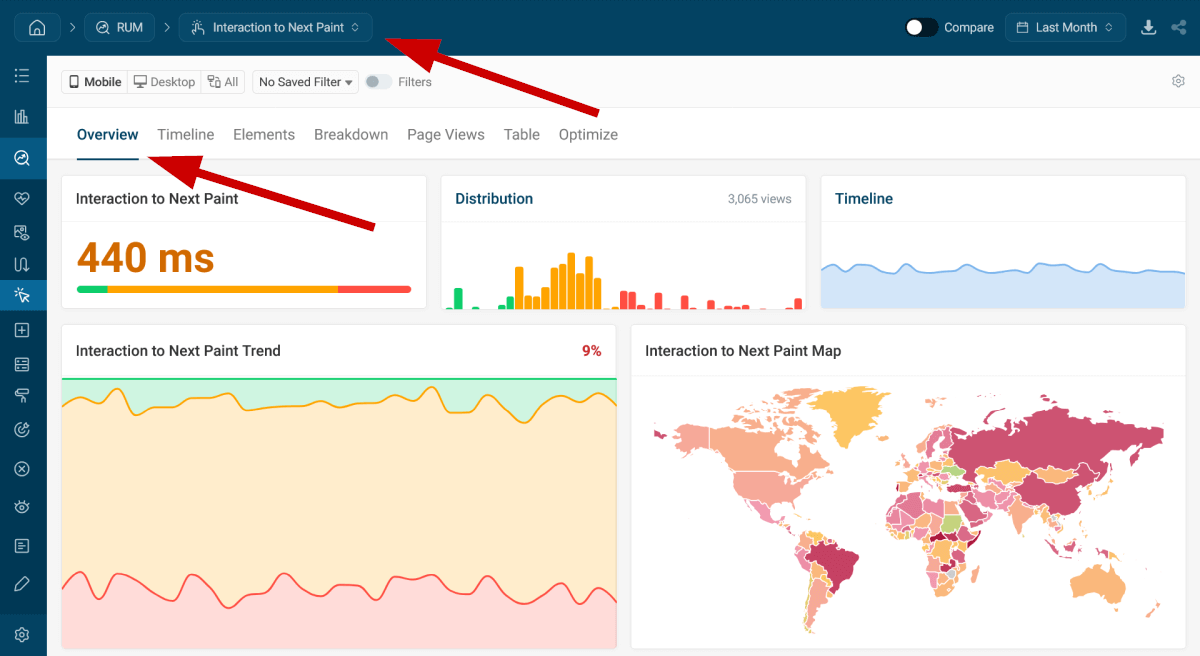
DebugBear RUM shows everything you need — for example, you can see a detailed INP overview, which is the Core Web Vital where you'll likely see the biggest improvement after installing React Compiler:
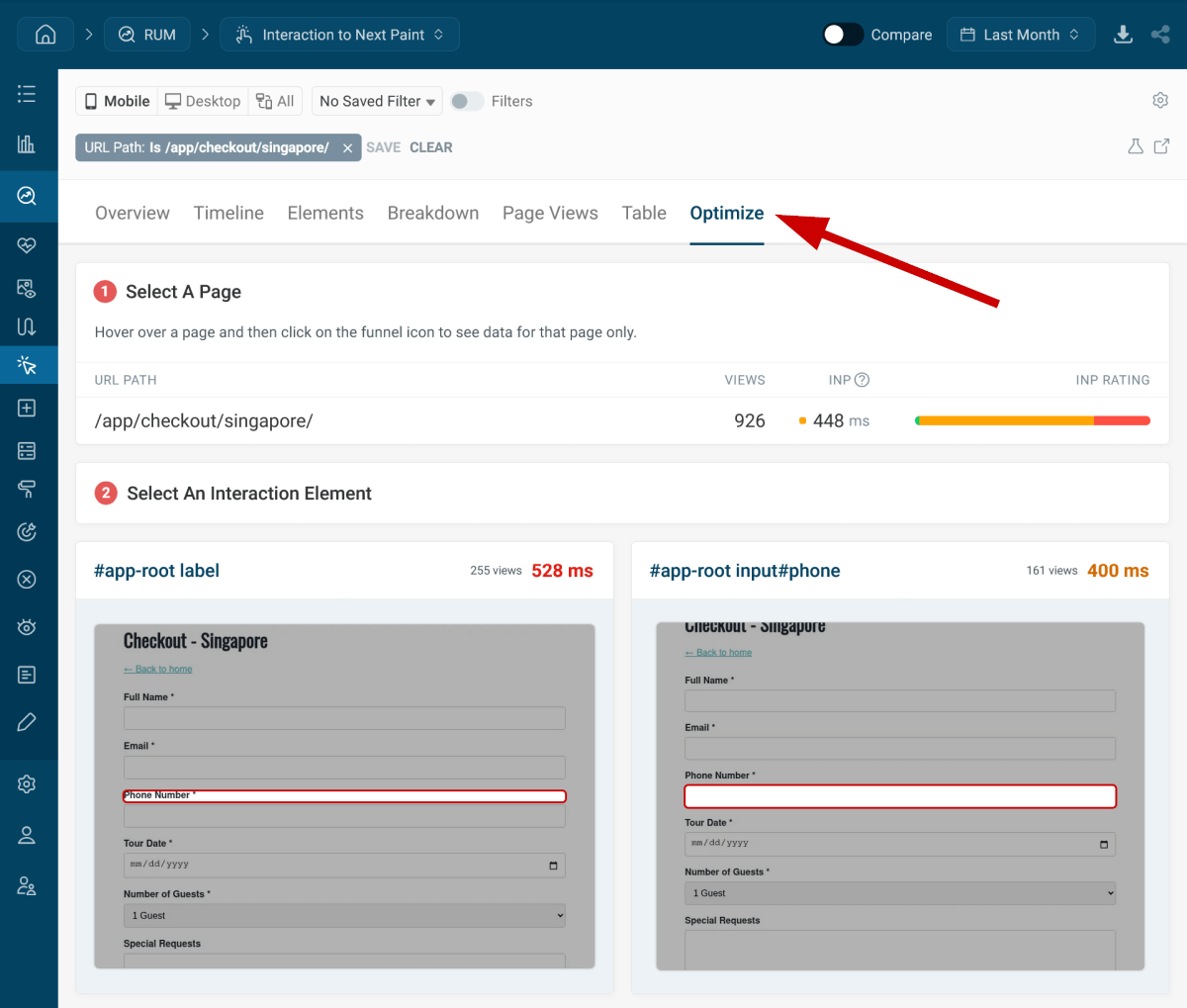
You can also filter for specific URLs to see how fast each interaction element responded and find optimization targets:
To get more visibility into your React app's real-world performance implications, sign up for a free 14-day trial that gives you access to the full DebugBear functionality.


Monitor Page Speed & Core Web Vitals
DebugBear monitoring includes:
- In-depth Page Speed Reports
- Automated Recommendations
- Real User Analytics Data