
Technical SEO is no longer just about ranking on Google. Your site also needs to be legible to AI engines like ChatGPT, Perplexity, Gemini, and Claude.
This article is a comprehensive guide to technical SEO in 2026, covering everything from crawling and indexing to Core Web Vitals, JavaScript rendering, and the tools that help you diagnose issues.
1. Introduction to Technical SEO in 2026
Definition and scope: what is technical SEO?
Technical SEO involves optimizing a website's infrastructure so that search engines can crawl, render, and index it—and, in the case of AI systems, also interpret the content correctly.
In contrast to content SEO, which focuses on "what is said" and link building—"who links to you"—technical SEO focuses on how the site works from the inside out (like looking under the hood of a car).
In 2026, there is much more to the world beyond Googlebot; therefore, we can say that the scope has expanded, and we are no longer focusing solely on search engines but also on generative response engines such as ChatGPT, Perplexity, Google AI Overviews and Google Mode, Gemini, and Claude.
Pillars of technical SEO in 2026
We no longer view "technical aspects" as merely essential for appearing in rankings; rather, we must also consider them a necessary condition for being cited, since AI-generated responses synthesize answers using various sources.
Therefore, we can identify several key pillars within technical SEO to build upon, serving as the foundation for everything else:
- Crawlability
- Indexability
- Performance
- Rendering
- Security
- Architecture
- Readability by AI "machines."
For the latter, we'll need to pay special attention to ensuring HTML isn't dependent on JavaScript, optimizing semantic content, and utilizing structured data that provides context, among other things.
The impact of AI on web infrastructure
One established fact is that content discovery no longer takes place solely on Google; there are other vertical platforms, such as YouTube or TikTok, as well as platforms based on response engines, like those mentioned earlier (ChatGPT, Perplexity, etc.).
Despite the debate within the SEO community over what to call this new reality, GEO (Generative Engine Optimization) has emerged as a discipline that some defend tooth and nail, while others simply accept it but view it as a natural evolution of SEO in today's world.
The vast majority of the steps involved in a project aimed at appearing in AI-generated responses draw on best practices that have been refined over decades through SEO strategies developed by top professionals.
The name itself is of little importance here, although perhaps in another article we could discuss at length whether these naming wars actually lead anywhere, and whether the narrative sometimes stems from vested interests that influence project owners.
Personally, I believe that more than 80% of the SEO we've been doing for so long still forms the foundation for appearing effectively in both search engines and answer engines. We can set aside specific aspects for GEO (or whatever we choose to call it), but the reality is that having a presence on Google is a solid and reliable path to appearing in the answers.
AI has enhanced certain areas, as the way traditional search engines work differs from how answer engines operate: Google has a vast index of sites curated over decades and updated in real time, in addition to possessing a massive technical capacity for rendering.
Response engines do not have an information retrieval system like the ones we've been working with since the dawn of search engines.
Another area that has been significantly impacted is digital PR strategies or traditional link building. It is now very feasible to optimize content to be cited by AIs, and in many cases, adding statistics, citable sources, and certain layers of clarity and fluency can be key to increasing visibility.
However, we are in a dynamic phase where there are still no established models regarding answer engines; therefore, we must continue to stay abreast of the advancements, changes, and improvements they implement. Will we one day see them develop their own index or invest in rendering infrastructure? That remains to be seen.
What is certain is that we already have a solid technical foundation in SEO based on the topics we'll cover here; however, we'll need to stay on top of major innovations or updates from these search engines so we can incorporate them into our SEO projects.
2. Crawling
Crawling is the first step in our technical SEO strategy. If a bot cannot access a page, it can impact both traditional search visibility and visibility in AI-powered search engines.
With the rise of AI-powered search engines, the landscape of crawlers has diversified, and beyond Googlebot and Bingbot, many other AI bots with different purposes have emerged.
HTTP status codes
The first signal a crawler receives when requesting a URL is the HTTP status code. Let's look at what each code means:
- 200 OK: The page exists and the content is available. This is the expected response for any page that should be crawled and indexed.
- 301 (Permanent Redirect): Indicates that the URL has permanently changed. It transfers most of the authority to the destination.
- 302 (Temporary Redirect): Indicates a temporary change. Google may choose to index the original URL or the destination URL, or even keep both indexed.
- 404 (Not Found): The page does not exist; this may be intentional or accidental. Google will gradually remove these URLs from its index as it crawls them.
- 410 (Gone): Indicates that the removal is likely intentional, and Google will proceed to remove the URL from its index.
- 503 (Service Unavailable): Indicates a temporary server issue. Googlebot will retry later, understanding that "maintenance" is underway.
Important: If a site relies on client-side JavaScript to display content on pages with 404 or 5xx errors, Googlebot may never see that content.
Robots.txt
The robots.txt file remains a key component of any SEO strategy aimed at improving the efficiency and control of the technical infrastructure related to crawling. Here are some considerations that should always be kept in mind:
- Crawl Management: The robots.txt file manages access for the many different bots that crawl the website. These bots can include search engine crawlers, such as Googlebot; tools like Ahrefsbot; AI bots like GPTBot; and many others. Using the Disallow and Allow directives, access instructions are specified by URLs, directories, or patterns, thereby preventing the waste of resources or crawl time on pages that have no value.
- Does not handle indexing: It is important to remember that this tool does not handle page indexing; therefore, if you want to prevent a page from being indexed, you must use the appropriate directives (noindex).
- Resource accessibility: It is essential not to block CSS or JavaScript files, as search engines like Google require them to render the page correctly and fully understand the content.
- Declare the sitemap: The file can also link to the sitemap file to provide access to the priority pages listed there.
- Meet the specific requirements:
- The file is located in the domain's root directory
- Each file controls crawling for each subdomain and protocol
- The file must be named exactly robots.txt (case-sensitive)
- UTF-8 encoded text file
- The maximum size is 500 KiB
- Be aware of certain conflicts that could affect your tracking:
- If you add a global block (
user-agent: *), keep in mind that the rules may be ignored if a specific block (user-agent: Googlebot) already exists. Sometimes the solution is to duplicate the rules for both user-agents. - When you want the same policy or rules to apply to all user agents, there's no need to duplicate blocks specifically for each bot. Using a specific user agent is a good idea when you're certain you want to add rules tailored to a particular bot.
- Don't be too redundant or detailed with the rules and sections you want to block. For example, consider blocking by prefix rather than by individual URLs:
Or use accepted patterns such asDisallow: /category/shoes/color/red/
Disallow: /category/shoes/color/blue/
Disallow: /category/shoes/color/green/*or$(end of the URL). Duplicating entries like this unnecessarily inflates the size of your robots.txt file.
- If you add a global block (
- Finally, the response codes in robots.txt and their potential impacts:
- It may have a redirect, in which case the final content would be considered valid for robots, but if there are too many redirects, this can lead to inefficiencies.
- It may return a 404 or 410 response, which would mean that there are no instructions or rules blocking anything, so everything could be crawled.
- However, if the response is 403 (Forbidden) or 401 (Unauthorized), this means that access is denied, and it should be interpreted as a complete block, meaning that nothing can be crawled.
- If the response is 429 (Too Many Requests), crawling is paused and retried later.
- For server errors (5xx), crawling is paused and retried later. If this behavior continues, Google gradually stops crawling.
For more information, check out Google's robots.txt documentation.
AI crawlers
Beyond traditional search engines, we also need to consider the rise of platforms like ChatGPT, Claude, and Perplexity in terms of crawling and robots.txt.
Why do these tools matter? AI systems crawl website content and contribute to the growth of the ecosystem of bots that access and consume web resources. Therefore, these points are worth considering:
- There are crawlers designed for training and others for search. The former collect large amounts of data to train models, while the latter crawl the web in real time to find sources that they can then cite in their responses.
- Blocking out of fear that your content will be stolen. This is a legitimate and normal approach, as long as you realize that blocking users means you won't gain visibility through their responses. If you block them, they won't use your content, but you also won't be recommended. Allowing access is the first step toward gaining visibility. This is a major strategic dilemma, so: it's up to you.
- Not all bots are required to follow the rules in robots.txt, which reduces its reliability as a control mechanism. And no, llms.txt is of no use in this regard.
| Company | User-Agent | Type | Impact |
|---|---|---|---|
| OpenAI | GPTBot | Training | It's the same as "providing your content to train models" |
| OAI-SearchBot | Search / Indexing for SearchGPT | It's the equivalent of "Googlebot within the ChatGPT ecosystem" | |
| ChatGPT-User | Real-time access | It is a browser agent | |
| Perplexity | PerplexityBot | Indexing for search | It's more of a reader than an indexer. |
| Perplexity-User | Real-time access | It is a browser agent | |
| Anthropic | ClaudeBot | Training | It's the same as "providing your content to train models" |
| Claude-SearchBot | Search / Indexing | It's the equivalent of "Googlebot inside Claude" | |
| Claude-User | Real-time access | It is a browser agent | |
| Googlebot | Search (but also AI, such as AI Overviews) | It's the equivalent of "having an online presence" | |
| Google-Extended | Training | It's the same as "providing your content to train models" | |
| GoogleOther | Support tracking (not Search) | It is the equivalent of "Google's internal crawling outside of Search" |
Understanding how each crawler behaves opens up interesting possibilities for SEO projects. Whenever a company uses bots for different purposes, we have more strategic options: we could appear in AI responses without sharing our data to train the AI.
You can learn more about their exact behavior and details on the official websites:
XML sitemaps
XML sitemaps remain essential for facilitating the discovery of URLs, especially on large sites. Best practices include:
- Include only canonical URLs with a 200 status code.
- Keep
<lastmod>dates accurately updated, as Google, Bing, and AI bots all use them as a freshness signal. - Segment sitemaps by content type (products, articles, categories) to facilitate prioritization.
- Remove URLs that return 404 errors, are blocked by robots.txt, or are duplicates.
- List the sitemap in robots.txt, though it can also be submitted directly via Google Search Console and Bing Webmaster Tools.
Automatically updating sitemaps when publishing or modifying content is becoming increasingly important in an environment where content freshness is a critical signal for both crawlers and large language models (LLMs).
Consider analyzing data from Google Search Console and Bing Webmaster Tools. Since these two tools have different approaches and features, you'll gain additional technical insights that can help you refine your analysis.
Crawl budget
Having examined several of the technical aspects involved in crawling, it is worth noting that the concept of a crawl budget helps us better understand the impact of a sound technical SEO strategy.
The crawl budget refers to the number of URLs a search engine crawls from a site within a specific period. It depends primarily on two factors:
- Server crawling capacity
- Crawling demand
Therefore, Google assesses how much of a site it can crawl without overloading the server, but it also determines how relevant the content is to it, based on popularity, recency, or backlinks.
This concept is particularly relevant for large or complex websites.
The main risk associated with this concept comes from situations such as duplicate content, an excess of parameterized URLs, or technical errors. All of this can cause bots to waste time on URLs that are of no value or not intended for ranking. This reduces crawl frequency and could even affect subsequent indexing, at the very least delaying it.
Other factors that help with crawling—and thus improve crawl budget management—include optimizing your site architecture and internal linking, along with properly configuring the technical aspects mentioned in this guide (robots.txt, noindex directives, canonical tags, sitemaps, etc.).
Finally, having a fast and reliable server also helps Google increase crawl frequency, so slow response times are not a good option for our crawl budget and frequency.
Cases that complicate crawling
In many situations, certain challenges can lead to crawling issues:
- Filters in e-commerce: If the store's configuration allows filters to be combined in multiple ways, this can generate vast numbers of URLs with similar or duplicate content, which could potentially waste crawling resources.
- Infinite scroll or "load more" pagination: Since bots do not scroll and typically do not interact with content without links, this could compromise the ability to crawl parts of a website configured in this way.
- Content that depends on JavaScript execution: In certain situations, websites that rely on JavaScript require specific configurations to ensure that content is properly accessible after rendering. These cases must be carefully understood and addressed to configure the project correctly and prevent crawling-related issues.
- Redirect chains: If redirects involve 3, 4, 5, or more redirects, we may be negatively impacting the behavior of crawling bots. The limit set by Google has always been Google itself, but in an era where traditional information retrieval, algorithms, and other systems used by Google incorporate AI in one way or another, it is advisable to specifically monitor this type of redirect behavior.
- Intermittent server errors: Another major issue is the server's inconsistent availability; when it's down, our crawl frequency can suffer.
- URLs with parameters: Sometimes parameters are added to URLs for various purposes: measuring campaign traffic, pagination, filters, feature concatenation, etc. Some of these situations can lead to duplication, and with large volumes of URLs, they result in wasted crawl resources.
3. Indexing
A page may be crawled but not indexed. Indexing is the process by which a search engine decides to store a page in its index and make it eligible to appear in search results.
Optimizing indexing ensures that important pages make it into the index and that irrelevant ones don't generate noise.
HTTP status codes and content indexing
While HTTP status codes determine whether a bot can access content during crawling, they determine what the search engine does with the information obtained during indexing.
- A 200 indicates that the page should be evaluated for inclusion in the index.
- A 301 indicates that authority should be transferred to the destination.
- A 404/410 indicates that the page should be removed from the index.
- A soft 404 (a page that returns a 200 status code but displays "not found" content) is particularly problematic because it confuses Google and wastes crawl budget.
- A 500 (server error) is initially treated by Google as a temporary issue, and it will retry later. If the error persists for an extended period, the page may be removed from the index in a manner similar to a 404. Additionally, frequent 5xx errors cause Google to reduce the crawl frequency for the entire site. During scheduled maintenance, the correct code is 503, which explicitly indicates that the unavailability is temporary.
Meta robots
The meta robots tag is the primary tool for controlling indexing at the page level. The most important directives are:
- noindex: tells the search engine not to index the page. This is the most reliable way to prevent a page from appearing in search results.
- nofollow: tells the search engine not to follow the links on the page (does not pass link equity).
- nosnippet: prevents Google from displaying a snippet of the page in search results.
- max-snippet:[n]: limits the length of the snippet displayed.
It's crucial to remember that blocking in robots.txt does not prevent indexing (if there are external links pointing to the URL, Google may still index it, displaying only the title). To reliably prevent indexing, you must use noindex.
Anything that isn't indexed is potentially invisible in AI responses, since most generative systems (ChatGPT, Perplexity, Google AI Overviews) rely on traditional search indexes—such as those from Google or Bing—to retrieve sources in real time. Without indexing, there is no retrieval; and without retrieval, there is no citation.
Canonical tags
The rel="canonical" tag is the signal that tells search engines which is the primary or original version, in cases where there are multiple identical or partially duplicated pages.
The purpose of this instruction is to spare Google the task of determining which URL version is correct; it achieves this by consolidating indexing and ranking signals into a single URL, preventing those signals from being fragmented.
It's important to note that this instruction is not a mandatory requirement, so Google treats it as a suggestion.
Some recommendations:
- It is good practice to use self-referencing canonical tags when there is no duplicate content across URLs.
- It is recommended to use absolute URLs.
- The canonical attribute should always point to indexable pages (never to 404 pages, redirects, or pages with the "noindex" tag).
- In specific cases such as pagination, it is preferable not to use this method to point to the first page (it can have negative consequences).
Poor canonicalization not only has negative implications for traditional search engines, but also increases the risk of an incorrect or unwanted URL being cited on platforms like ChatGPT.
Depth levels
When it comes to the concept of depth, it's an aspect that helps us improve the website by focusing on its structure and internal linking.
We define depth as the number of clicks a user or a bot needs to reach a specific URL from the homepage.
From a technical perspective, this can affect both the crawling and indexing layers, especially if the site is large.
If there are too many levels, we could be making it harder for users or bots to find content, with the resulting consequences: a poor browsing experience for users or a risk of reduced crawling frequency for bots.
It could also impact the crawl budget if important pages are buried too deep in the site, as this increases the time it takes to discover them.
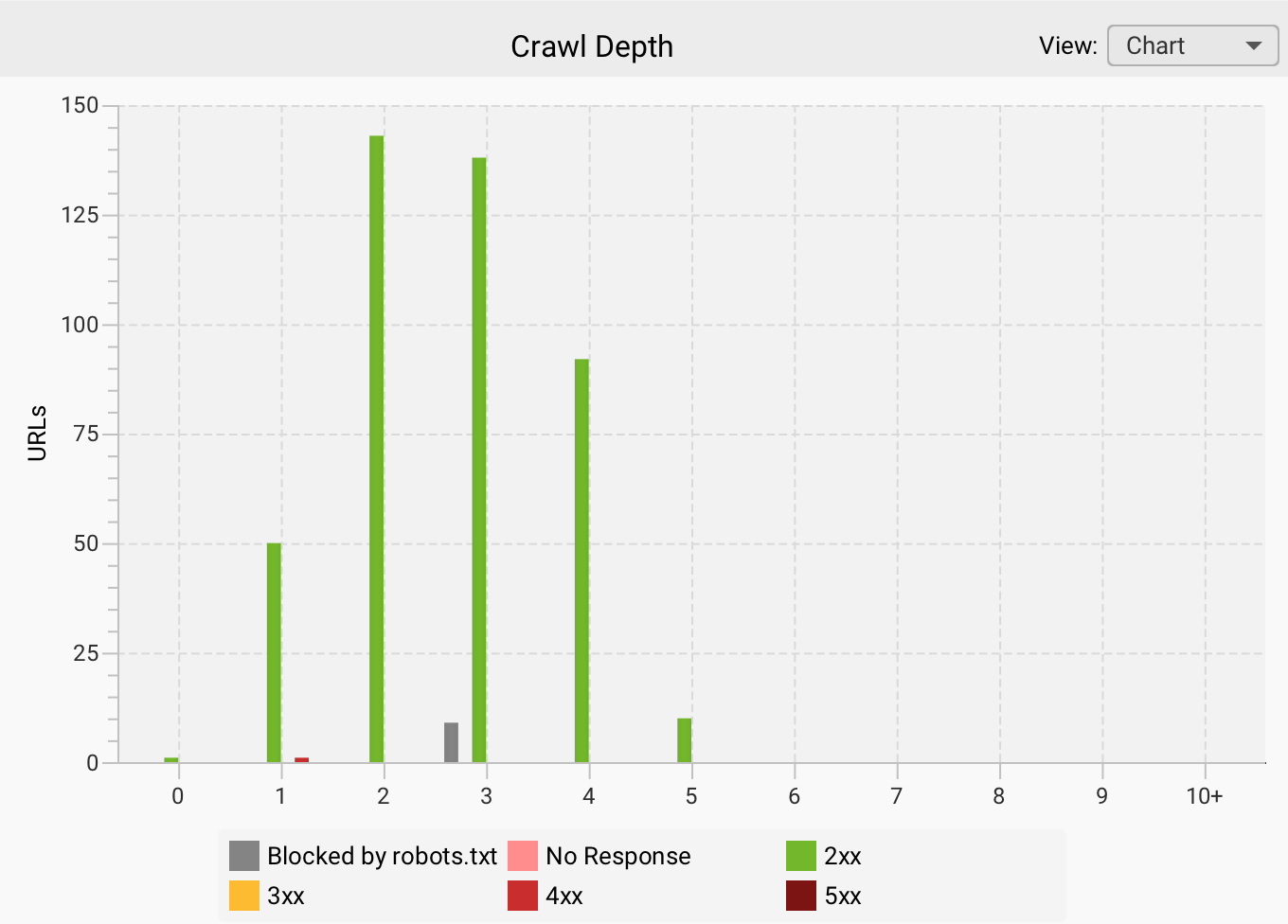
When it comes to architecture, the key is to focus on internal linking strategies that connect pages within structures that aren't overly complex.
This also promotes a better distribution of link equity, reinforcing authority signals toward the main URLs. Here are some ideas:
- Do not link to the same destination URL more than once
- Use elements such as breadcrumbs to provide semantic and structural context
- Add blocks of related links, always keeping the user experience in mind
- Add horizontal, vertical, and cross-site link blocks based on the site's theme
In summary, deep pages are marked with indicators of low structural hierarchy, which means they may be crawled less frequently and may even be interpreted as less important.
Mobile-first indexing
Here is one of the key factors for understanding modern technical SEO—one that doesn't always get the attention it deserves. Google uses the mobile version of a website to crawl, index, and rank content.
Therefore, differences between the two versions in terms of content, internal links, semantic markup, and other tagging can lead to a loss of visibility if the approach is incorrect or if this concept is overlooked.
We need to ensure a certain level of consistency across versions and always prioritize the mobile version; the most important elements must be present in that version.
Therefore, if the mobile version is slower, incomplete, or has usability or UX issues, it could negatively impact crawling. We can also add other factors, such as loading speed, resource size, and JavaScript loading, among other things, which become key technical elements that affect performance.
If we apply this concept to the context of AI, we must keep the mobile version in optimal condition to prevent misinterpretations by AI systems and, if we serve as a source for responses, to minimize errors.
Issues that complicate indexing
The most common issues that can cause problems or prevent a page from being indexed are:
- Content quality. If the content has little value, is superficial, or does not address the search intent, it may be completely ignored by Google and other search engines, making it less likely to be indexed.
- Duplicate content. Identical or very similar content generates negative signals and dilutes authority, to the point that important pages could be left out. We are already seeing international websites being deindexed for using the same content across different markets, without providing any differentiation or added value.
- Orphaned or deeply nested pages. From the perspective of page discovery issues—or even simply because they are unlinked or located at very deep levels—these pages may be considered unimportant.
- JavaScript. If the main content depends on rendering and the site configuration is not appropriate, this can increase the risk of non-indexing.
- HTTP errors and redirect chains. If URLs have persistent server errors or mistakenly return a 404 response, it will be difficult for them to be indexed or remain indexed. On the other hand, if there are multiple redirects that end at a URL containing a noindex tag or returning a 404 response, this will also contribute to pages being deindexed.
- Dynamic loading in pagination. Systems such as infinite scrolling or "load more" buttons can make it difficult to discover content further down the page. If that content isn't linked to from other parts of the site, it can lead to indexing issues.
Important: Content that isn't indexed won't be visible in search engines, nor in ChatGPT and other AIs that rely on search engine results from Google and Bing when they can't generate a response without accessing the internet.
4. Performance and Core Web Vitals
Website performance affects both Google rankings and the user experience, and with the rise of zero-click results, websites that do receive clicks need to deliver an exceptional experience right away.
Critical user experience metrics
- LCP (Largest Contentful Paint): This is the time it takes for the main element of the page—whether an image, a block of text, etc.—to appear. Ideally, it should load in less than 2.5 seconds. This metric impacts the user's initial perception.
- INP (Interaction to Next Paint): This metric replaces the previous one called FID and aims to evaluate the website's responsiveness to user interaction, such as clicks, taps, or input. The target is to achieve a value below 200 ms, which indicates a smooth, frictionless experience.
- CLS (Cumulative Layout Shift): This metric measures visual stability during loading; therefore, it aims to ensure that elements do not move unexpectedly, to prevent interaction and navigation errors. For this, the ideal value would be less than 0.1.
Load speed optimization
- Image compression (WebP/AVIF). Using modern formats results in higher compression, which drastically reduces image file sizes without compromising visual quality. This improves the LCP and reduces data usage, especially on mobile devices. You can visit the caniuse website to check which modern formats are supported by each browser version.
- Code minification: Another way to improve speed is through code optimization using minification. This involves removing spaces, comments, and unnecessary characters from HTML, CSS, JavaScript, and other code. All of this helps reduce file size and speed up download and execution in the browser.
- Use of CDN: Content Delivery Networks enable efficient content distribution with a global network of servers, reducing latency and load times by serving resources from locations closest to the user.
Check out our guide to improving SEO using Content Delivery Networks.
Technical performance diagnostics
There are many tools available for diagnosing technical performance, which will be discussed later in this guide. Some considerations for a proper diagnosis:
- Conduct periodic analyses
- Identify performance improvements on one hand and track metrics on the other.
- Combine lab data and user data
- Break down issues by device
- Prioritize based on the development time required for changes relative to the expected benefit
For example, using PageSpeed Insights, we can run diagnostics for each device and identify improvements to apply to each Core Web Vitals metric.
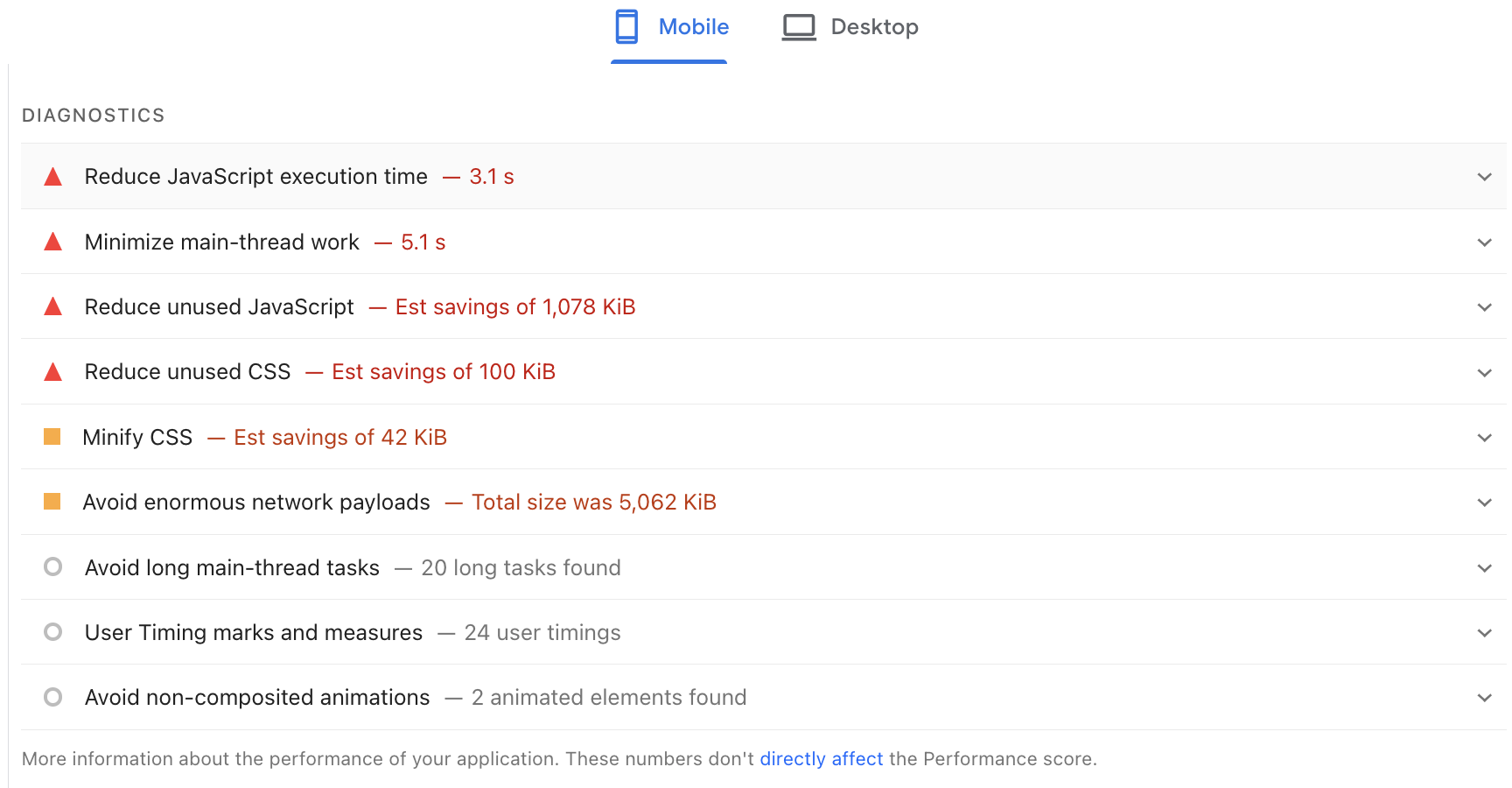
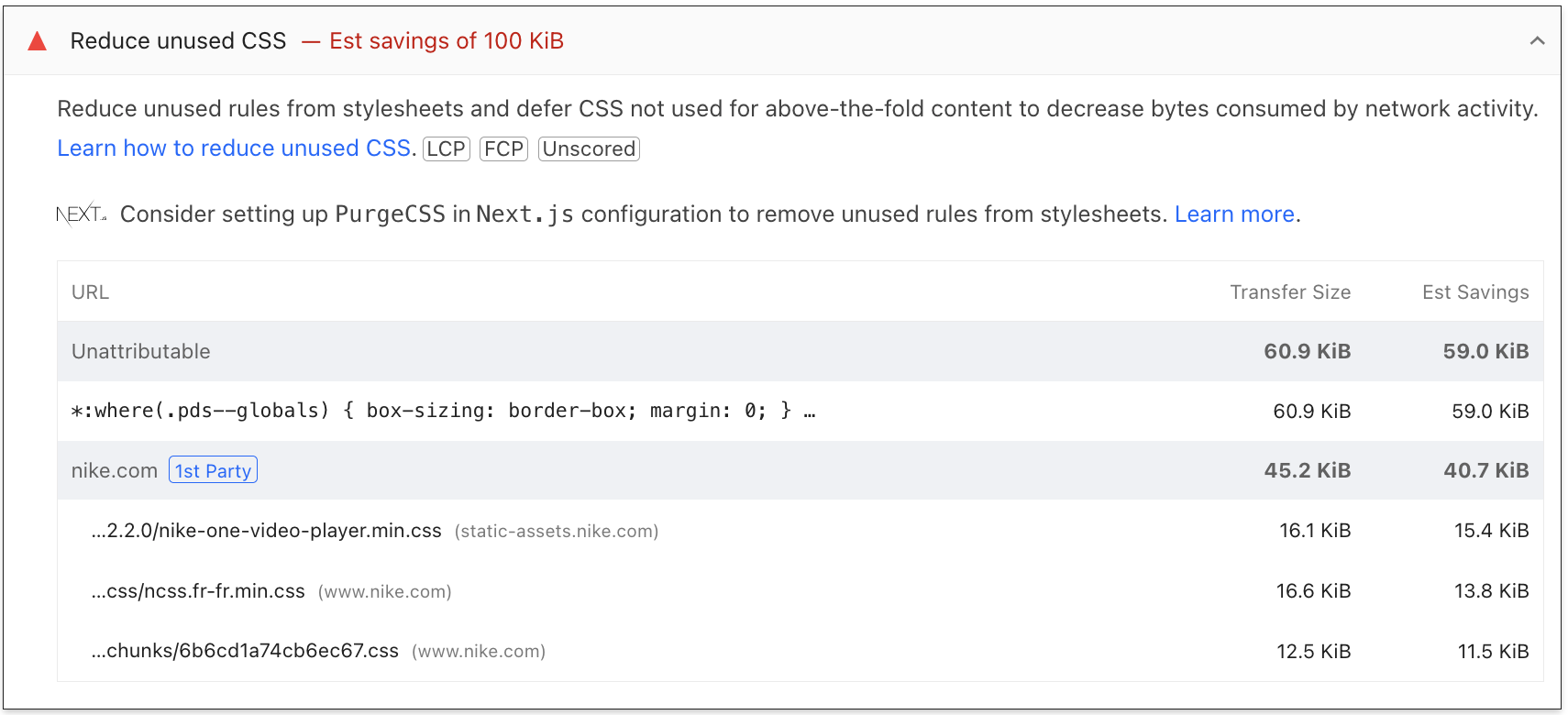
If we want to go into more detail, simply expanding the section allows us to better understand what the diagnosis entails and delve deeper.
5. JavaScript SEO and rendering
JavaScript is ubiquitous on the modern web, but its relationship with SEO remains complex. Although Google has improved rendering capabilities, server-side rendering (SSR) is still the recommended approach to ensure that pages have the greatest potential to rank in organic search.
For AI bots, the situation is even clearer, as most AI crawlers do not execute JavaScript. If critical content relies on JS to render, it will be invisible to systems like Perplexity, ChatGPT, or Claude.
This makes the rendering strategy a business decision with a direct impact on visibility.
CSR (client-side rendering)
In this type of implementation, the server sends an initial HTML file to the browser and delegates the entire task of building the webpage—that is, the rendering—to the browser.
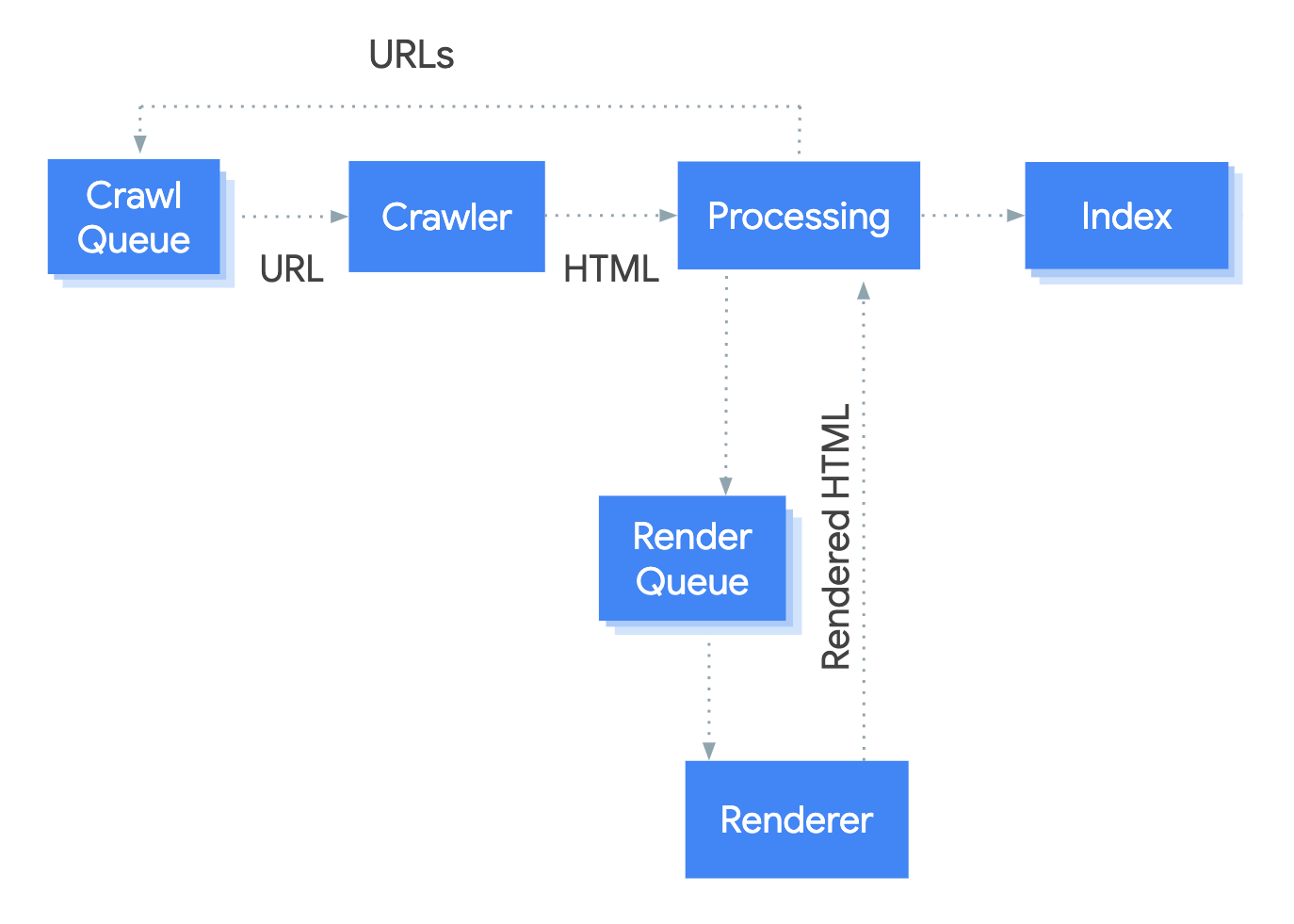
In the current landscape involving browsers, bots, and AI chatbots, we face the challenge that these do not execute JavaScript, so they would see the page without any content. In the case of Google, which does have more sophisticated (and costly) rendering systems, it splits processing into separate phases, and this can sometimes result in indexing delays or increased crawl budget consumption.
SSR (server-side rendering)
In this type of implementation, the HTML is generated on the server before being sent to the browser. This improves accessibility for search engines and AI systems, as there is no need to execute JavaScript. The content is visible immediately, which can lead to better scores on metrics such as LCP. It should be noted that this option may result in higher costs for the project.
Diagnostics
Detecting and identifying issues related to JavaScript can be done using various techniques or tools. For example, we could partially determine whether a website uses CSR or SSR by enabling and disabling JavaScript in the browser and examining the code generated in the source code and in the Chrome DevTools. However, this method isn't 100% effective, as errors can occur.
We can also use technology detectors like builtwith or wappalyzer, which can tell us which frameworks a website uses.
On the other hand, there are also crawlers like Screaming Frog or Sitebulb that allow you to simulate the behavior of Googlebot or other bots and configure crawling in text mode or JavaScript mode—that is, using rendering. You could even compare the results to identify differences, errors, or opportunities.
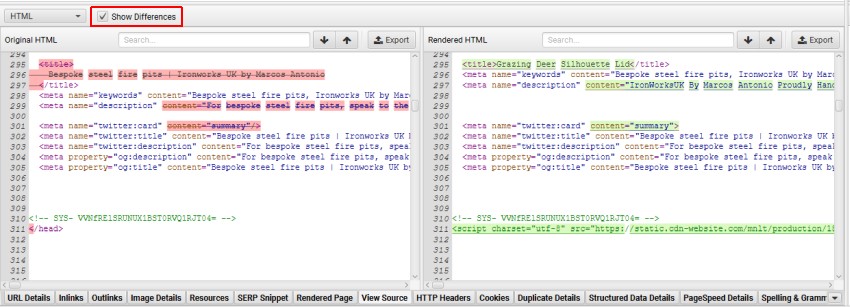
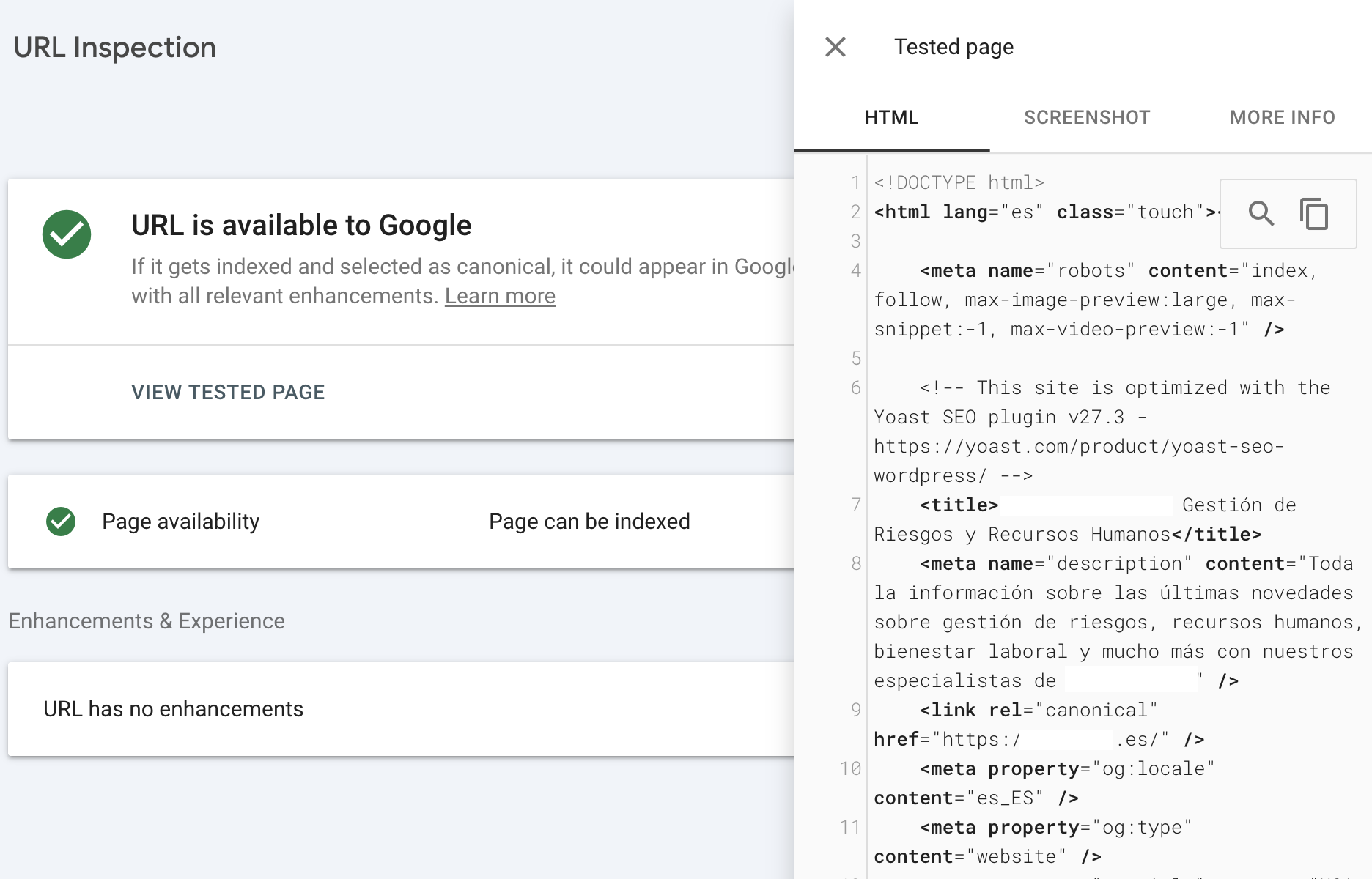
Finally, the preferred method is to use the URL inspector in Google Search Console, as this allows us to view the resulting code after rendering and thereby identify whether the configuration is hybrid or one of the types mentioned above.
When working on projects where we are not the actual owners, we can try to start the collaboration with a kick-off meeting to gather all relevant information, including technical details, the tech stack, and even speak with the lead team.
6. Security
HTTPS
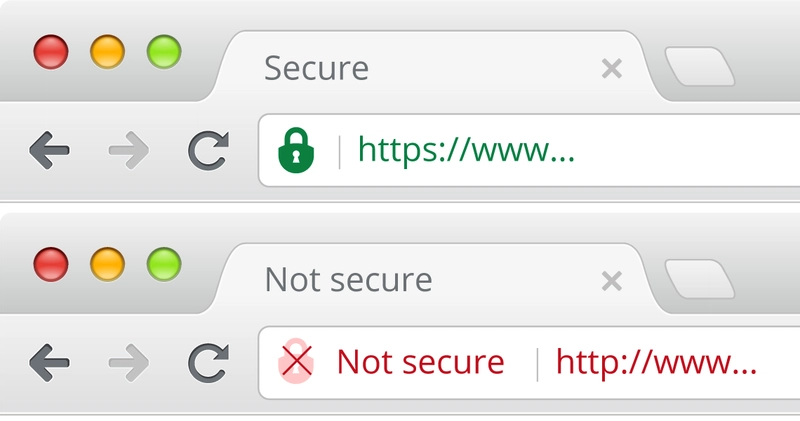
In technical SEO, one factor Google takes into account is the use of HTTPS, which ensures a secure connection between the user and the server. Furthermore, when a website does not comply with this protocol, browsers alert users to potential security risks associated with accessing pages that lack it.
While it doesn't directly boost search rankings, even though it is taken into account, its greatest benefit is ensuring user trust and a positive experience.
Mixed Content
Mixed content occurs when insecure resources are linked on a website that uses HTTPS. These can include images, CSS or JavaScript files, or even links pointing to the HTTP version of any page.
This can lead not only to security risks but also cause browsers to display warnings that affect the site's design, functionality, and loading speed.
From a technical point of view, these situations can impact access to content, and if these errors affect performance or search engine visibility, they will also indirectly impact visibility within AI systems or their responses.
7. Technical SEO in the multi-platform and multi-format era
If anything is evolving and changing, it's that Google is no longer the main player, and the organic ecosystem is now expanding, with content serving as the strategic hub distributed across multiple platforms and formats.
Technical SEO is no longer the exclusive domain of traditional search engines like Google, so we must ensure that wherever our content is, it can be accessed, consumed, interpreted… and reused.
Let's look at some aspects to keep in mind.
Considerations regarding formats
Link all assets and formats to ensure their accessibility and, most importantly, try to avoid making them dependent on JavaScript. Whenever possible, add semantic context using structured data from the most relevant Schema type.
- Video: Video consumption has grown significantly, presenting a huge opportunity for website owners to work on video ranking on Google or on specific platforms like TikTok, YouTube, or Instagram… When integrating this format, it will be vital to consider the use of transcripts, captions, and structured markup (VideoObject) to help search engine bots and AI better read and understand the content.
- Images: We've already mentioned the use of efficient, next-generation formats like WebP or AVIF; it will also be vital to use relevant filenames and add descriptive alt attributes.
- Audio and podcasts: Whenever possible, add transcripts, metadata, and structure the content to influence indexing.
Considerations regarding platforms
Since content discovery no longer occurs only in search engines but across many more platforms, here are some considerations—some more technical than others—to keep in mind:
- Search engines and AI (Google, ChatGPT, or Perplexity): use accessible content that does not rely on JavaScript rendering, add structured data, and manage accessibility via robots.txt.
- Vertical platforms (YouTube, TikTok, Instagram): always monitor metadata on these platforms, add captions and descriptions whenever possible, and use structured data when it is integrated into our website.
- Entity consistency and E-E-A-T (Experience, Expertise, Authoritativeness, and Trustworthiness): try to connect all brand assets or the topics we cover by using Schema.org's Organization, ProfilePage, SameAs, and other relevant schemas. The key to all these signals is to generate consistency, coherence, and authority.
8. Essential tools
Google Search Console
Google Search Console offers specific reports that can be extremely useful, serving as the most direct source for evaluating and diagnosing all aspects of technical SEO.
- URL Inspection: an essential tool for identifying issues related to crawling, rendering, and indexing at the individual URL level, among other things.
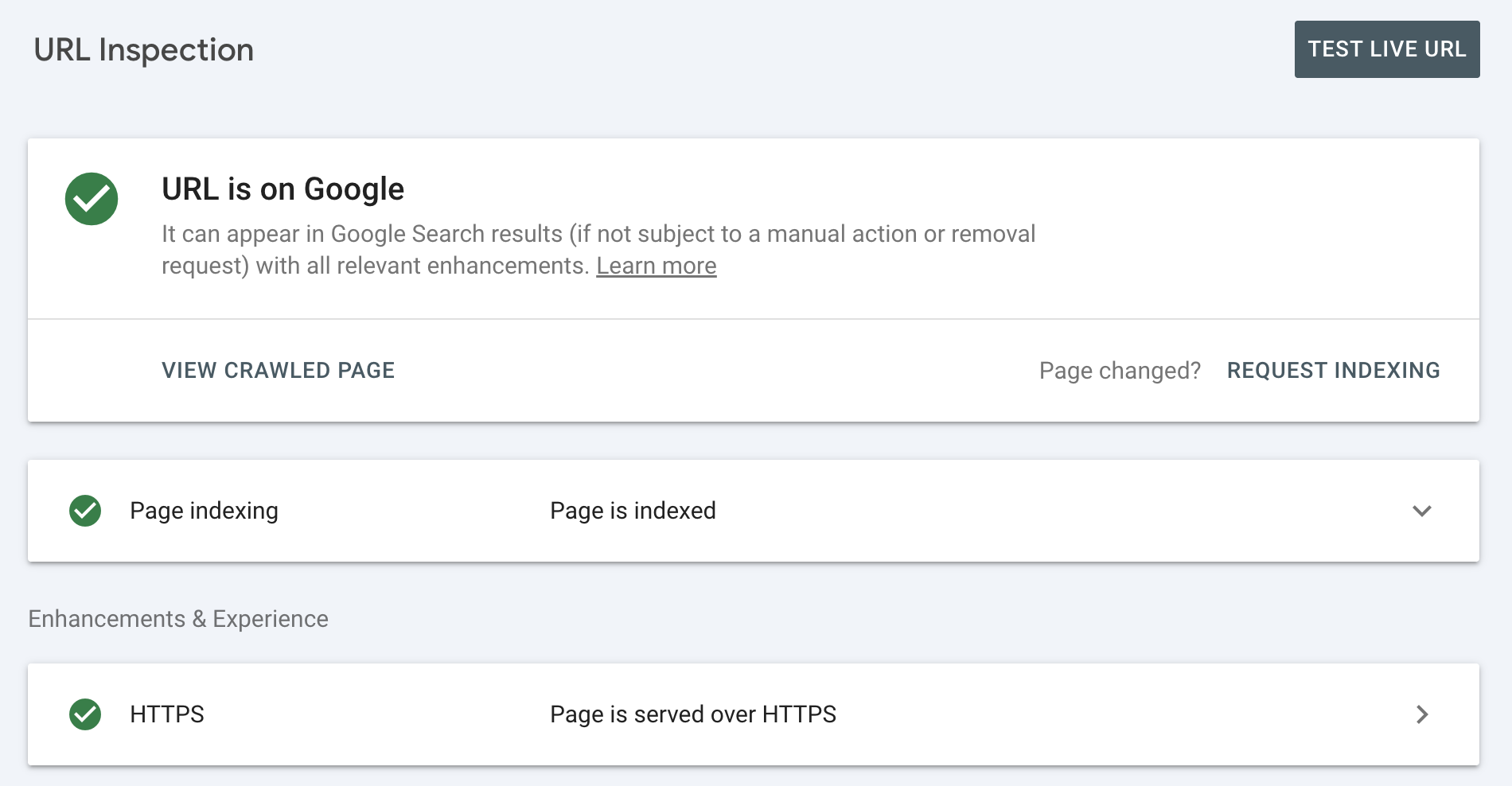
In addition, if you want to view the crawled page, you can run real-time tests to see how the page renders.
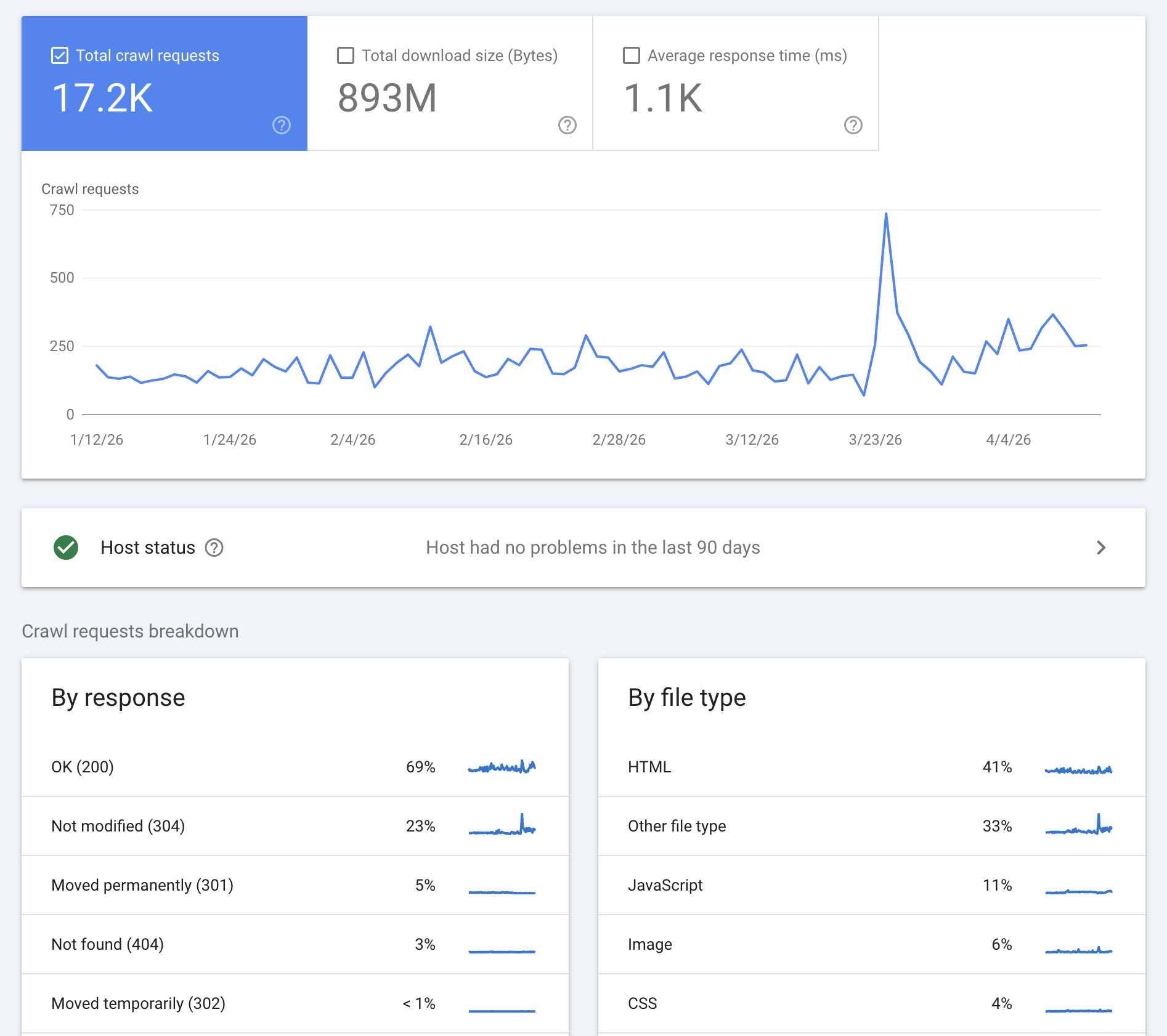
- Crawl stats: Understand how Google crawls the website and other details such as formats and response codes, based on a sample and a time frame that allows you to link them to milestones or developments.
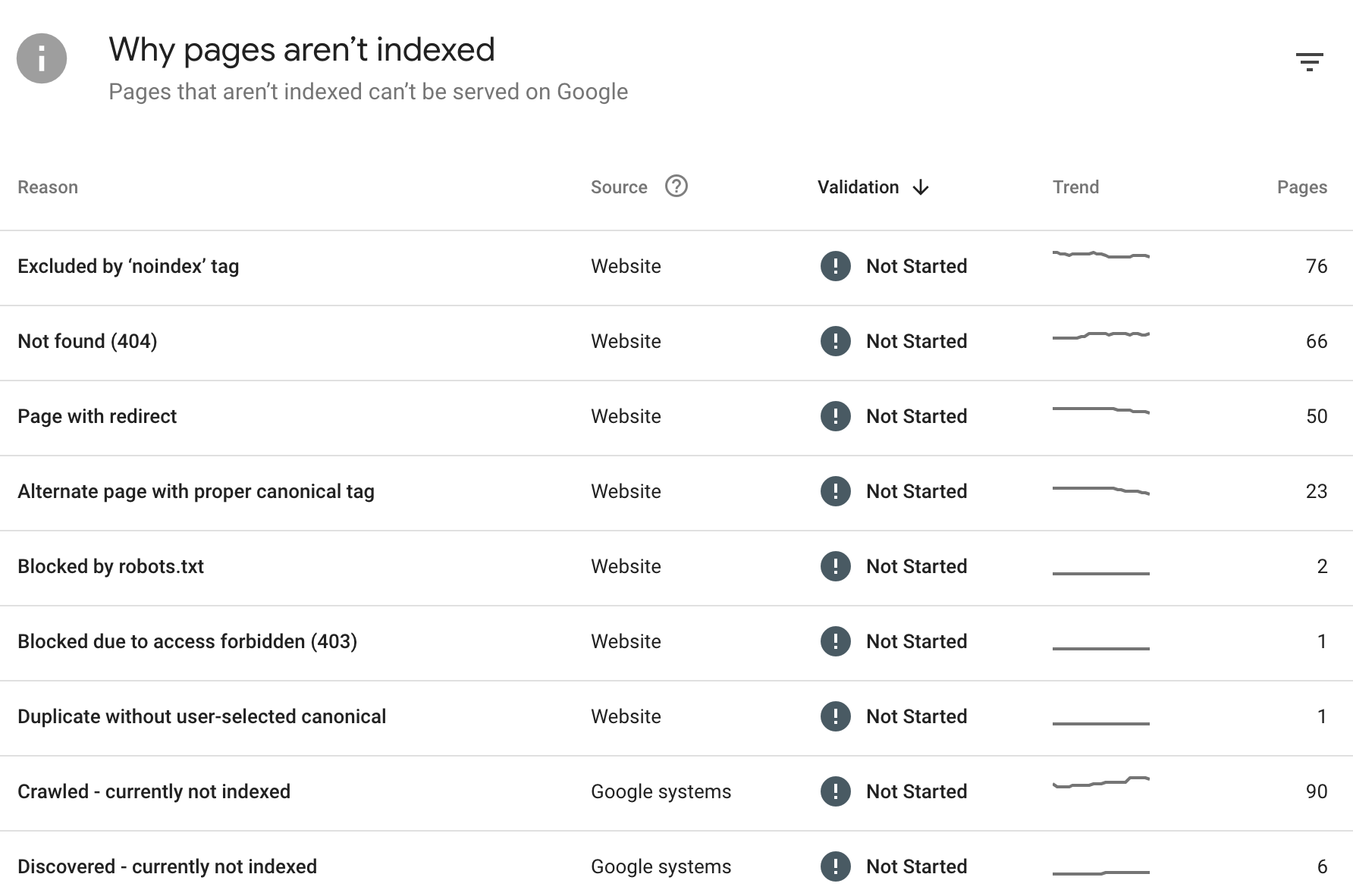
- Indexing: You can check which pages are indexed and which are not, along with the possible causes and the number of URLs in each case. This is valuable information for identifying important pages that are not being indexed.
- Core Web Vitals: Trends in URLs that are good, poor, and in need of improvement over the past few months; data is sourced from the Chrome User Experience Report.
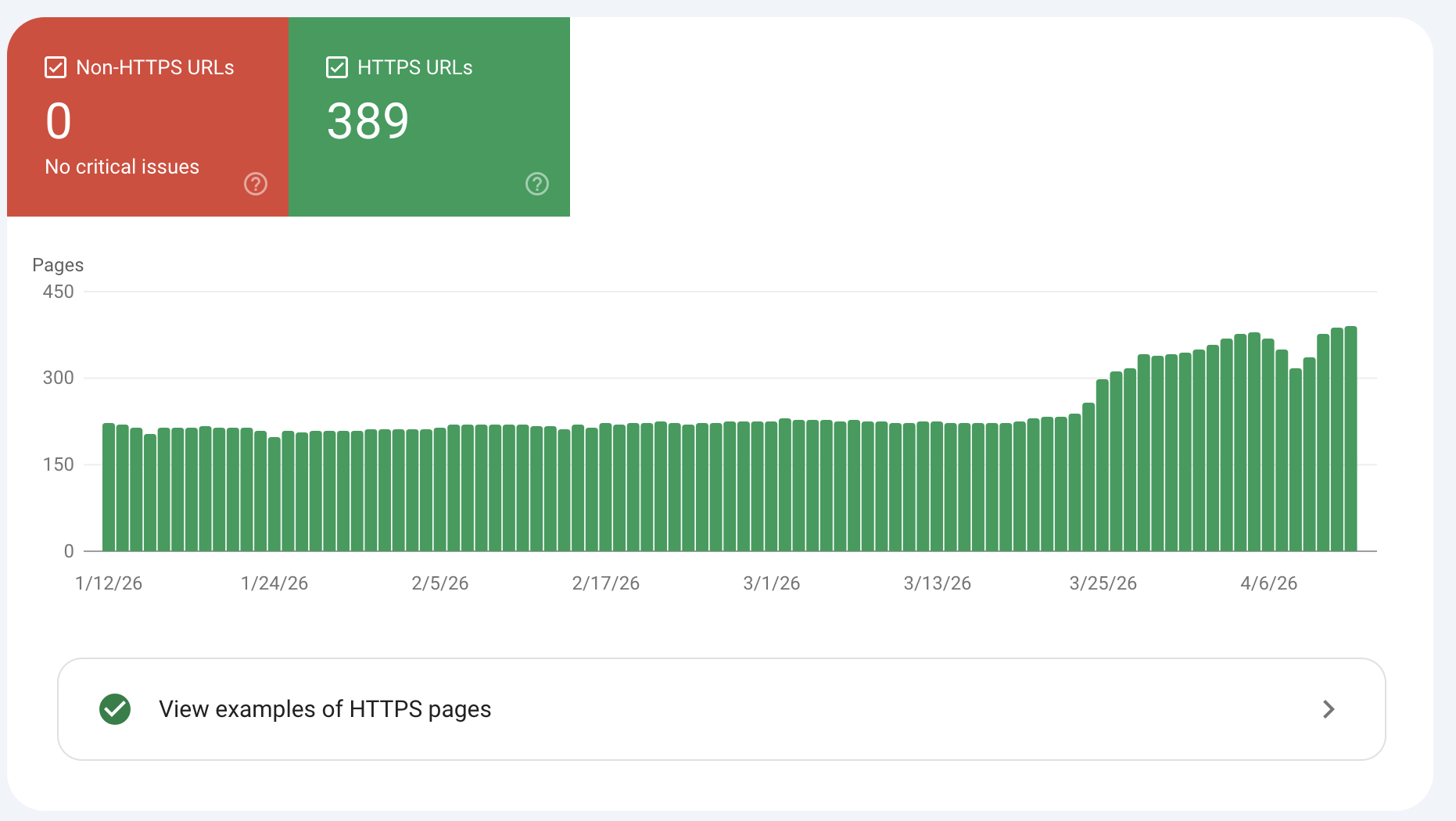
- HTTPS: Identifies whether there have been any HTTP URLs in recent months.
Third-party crawlers
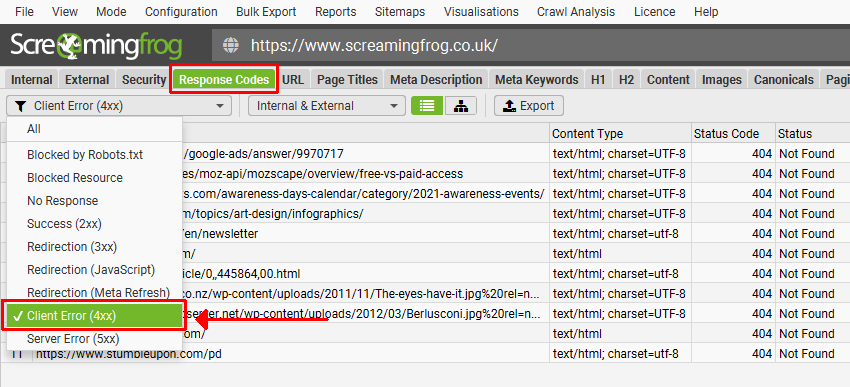
Any crawler—such as Screaming Frog, Sitebulb, Oncrawl, or others—offers multiple features, the main one being the ability to simulate the behavior of various bots in bulk.
This allows you to analyze the site architecture, linking structure, response codes, redirects, and various tags such as canonical, noindex, etc. These are the tools that allow for comprehensive audits, including the integration of traffic data from Google Analytics or Google Search Console.
Finally, regarding crawling and indexing, you cannot determine the status in search engines, but rather the effectiveness and indexability—that is, the strategy implemented, not the results obtained as such.
Core Web Vitals monitoring
To specifically track Core Web Vitals, you can use open-source tools like Google's Page Speed Insights or Lighthouse. These tools combine lab data with real-world data (CrUX or RUM) to measure the metrics mentioned above: LCP, INP, and CLS. They also provide detailed, specific diagnostics.
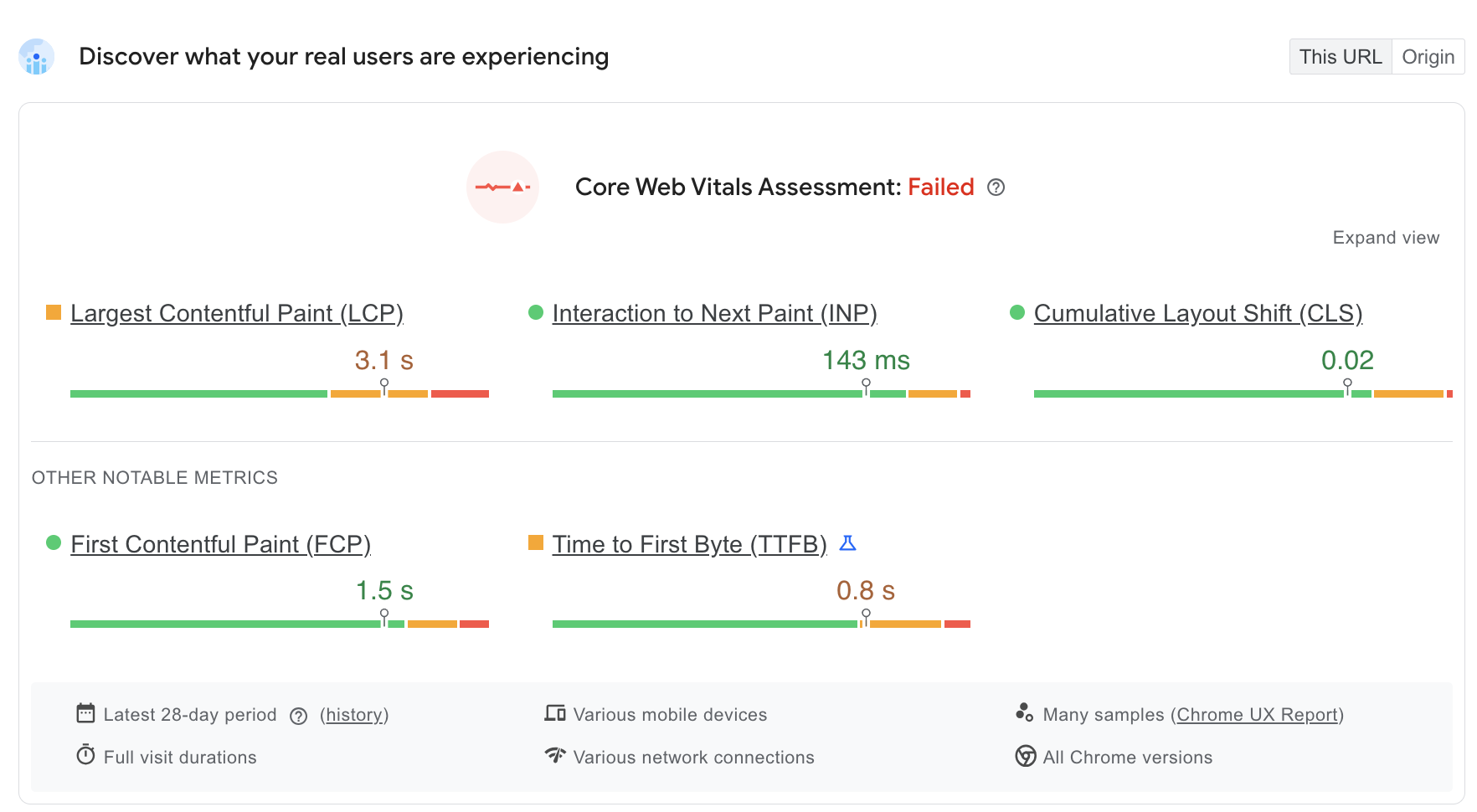
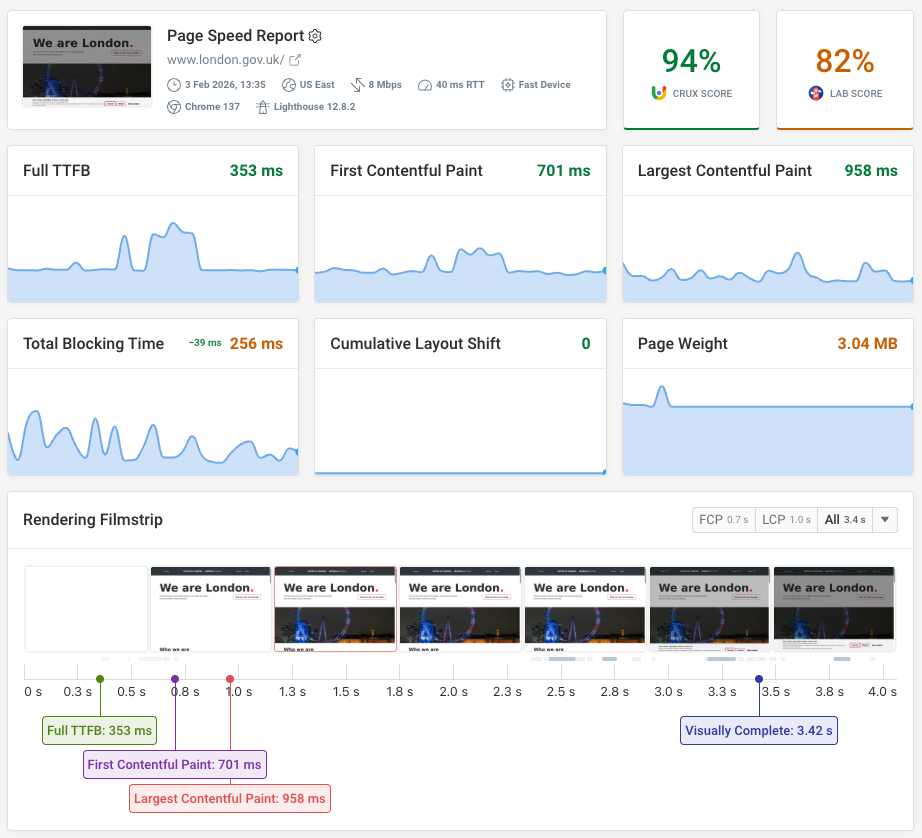
On the other hand, DebugBear is particularly useful for continuously monitoring Core Web Vitals, analyzing field and lab data, and detecting performance trends over time, at the page level on any website. This means that the foundation of technical SEO will be 100% monitored.
9. Interactive Technical SEO Checklist
Use our interactive checklist to review technical SEO on your website. You can filter to only focus on high-priority tasks, or to view only the items that impact Search or AI visibility.


Monitor Page Speed & Core Web Vitals
DebugBear monitoring includes:
- In-depth Page Speed Reports
- Automated Recommendations
- Real User Analytics Data