
Preconnect hints are a useful tool to optimize website performance. But what happens when a page uses many preconnects at once?
In this post, we'll explore preconnect limits and how excessive preconnects can impact performance.
What are preconnect hints?
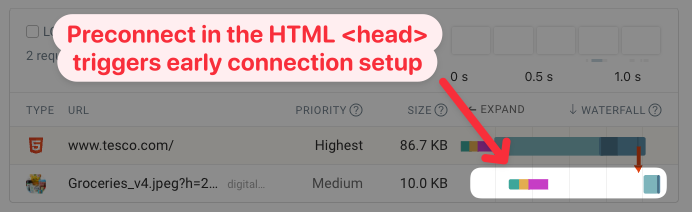
Preconnect hints are a web performance optimization technique that allows browsers to establish early connections to important third-party origins. Then, when a resource is requested from that server, the connection is already established, reducing the time it takes to load the resource.
This request waterfall shows an example where the server connection is made before the browser discovers the resource that's loaded from that server.
Do extra preconnect hints slow down your page?
Overuse of preload hints is a common web performance problem. But does adding many preconnect hints cause similar issues?
To find out we ran performance tests on a page with an image and between zero and 20 preconnects. Additional preconnects did not result in a noticeable increase in the Largest Contentful Paint metric.
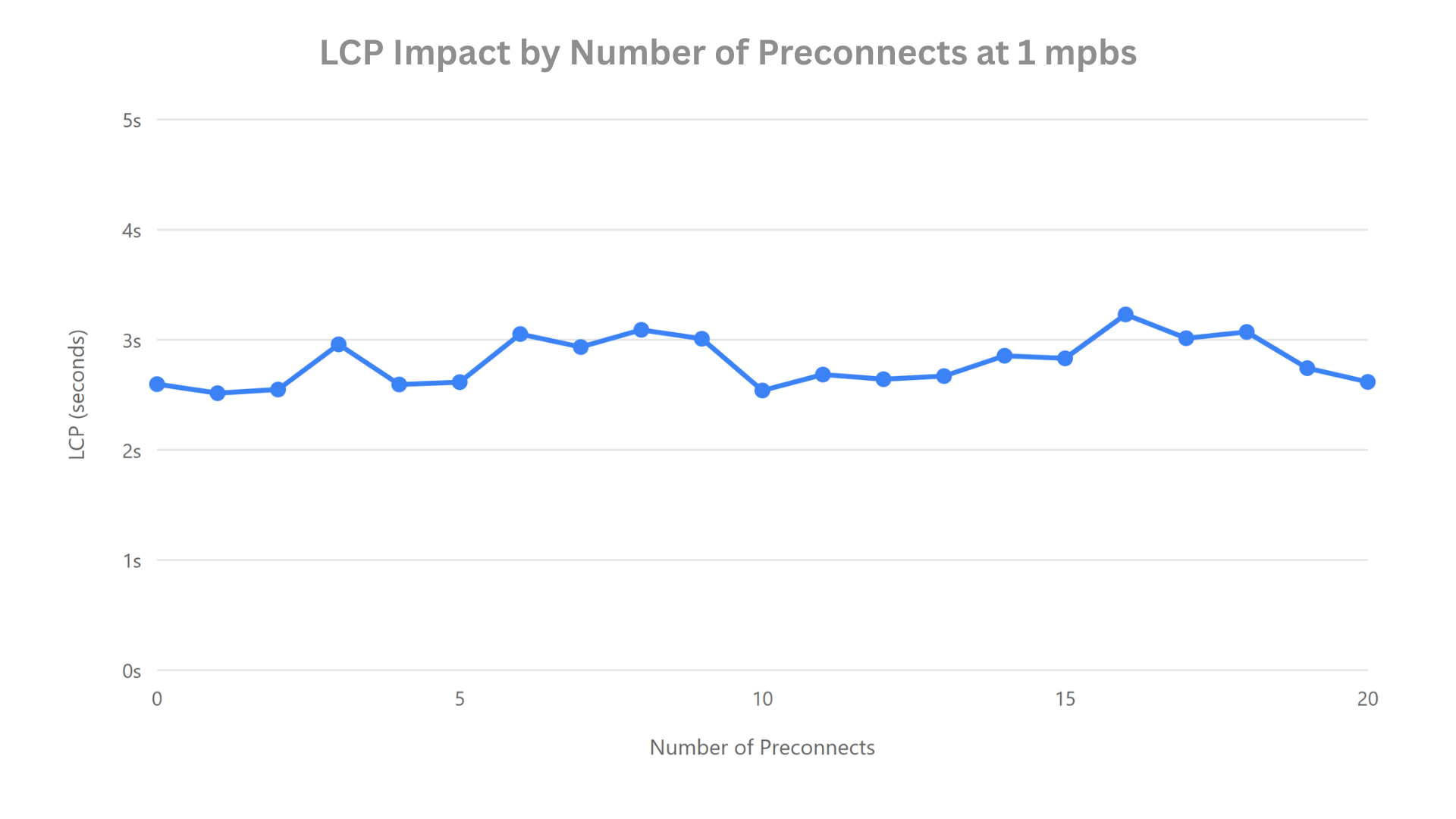
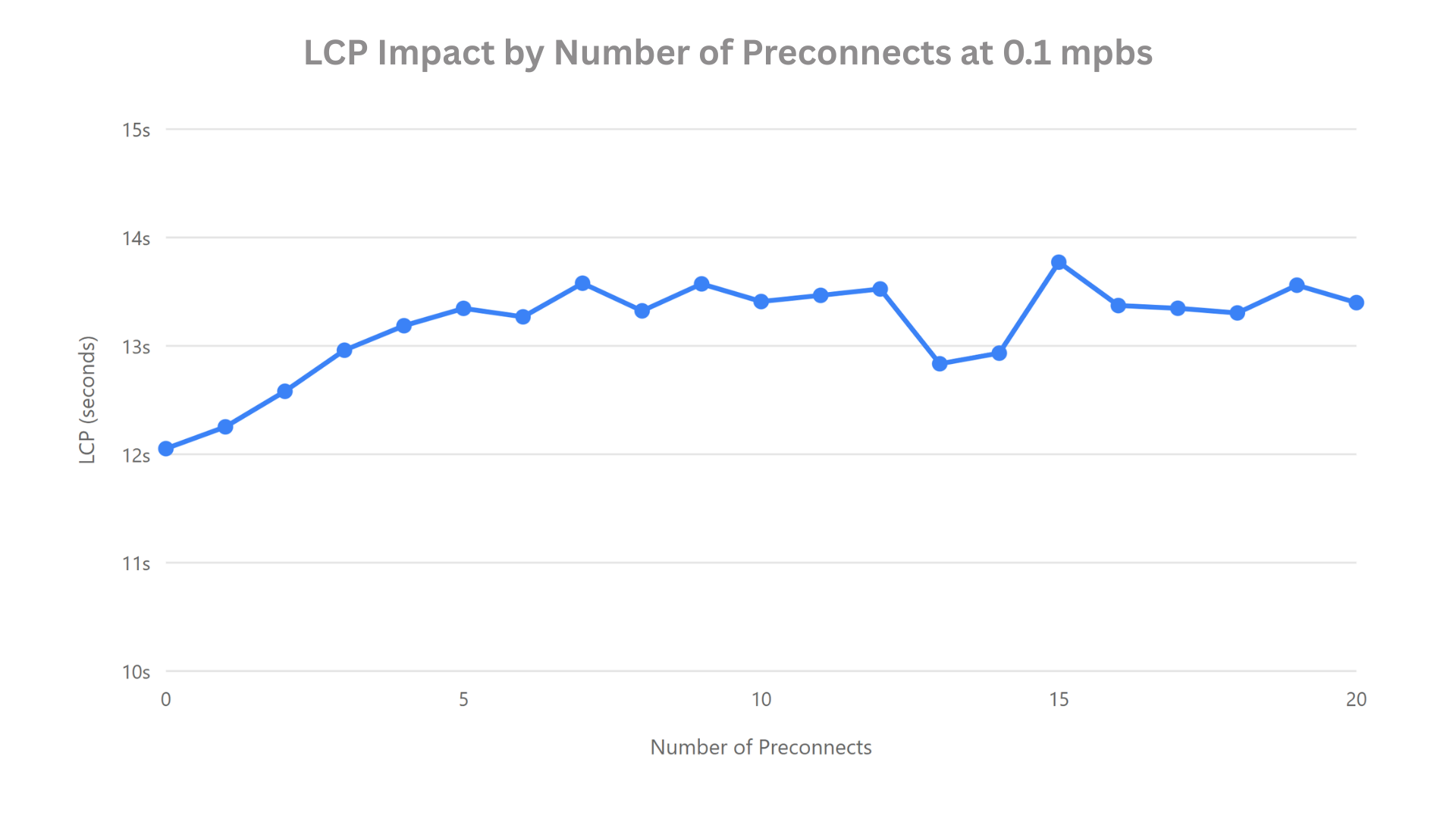
The tests above were run using a slow connection with 1 Mbps bandwidth. That's already pretty slow even for a mobile network. But if we slow the connection down even further to 0.1 Mbps, do the preconnect hints start making a difference?
Adding preconnect hints now results in a noticeable increase in page load time. However, after adding the first few hints the impact of additional preconnects is minimal.
Why could preconnect hints slow down your page?
HTTP Server connections are required before the browser can make an HTTP request for a resource. They involve the IP lookup over DNS, the TCP handshake for connection reliability, and the SSL/TLS negotiation for encryption.
Establishing a server connection takes some amount of processing time, but more importantly it involves using bandwidth to exchange data on the network.
DNS lookups involve very small packets and therefore have a minimal impact on available bandwidth, while TCP handshakes are also relatively lightweight.
In contrast, the SSL/TLS phase requires a larger exchange of data, including certificates and cryptographic key negotiation between the client and server. Because this step transfers more data than the earlier connection stages, it becomes more sensitive to network congestion.
Still, as we've seen the impact is hardly noticeable on even a relatively slow connection. In most cases, an additional server connection has a minimal effect on other page resources. Though of course how quickly the connection itself is established still matters for resources loaded over that connection!
Understanding how Chrome processes preconnect hints
If we look at a request waterfall view with many preconnect hints we can see that Chrome does not set up all connections at once. Instead the hints appear to be processed roughly in batches of 3.
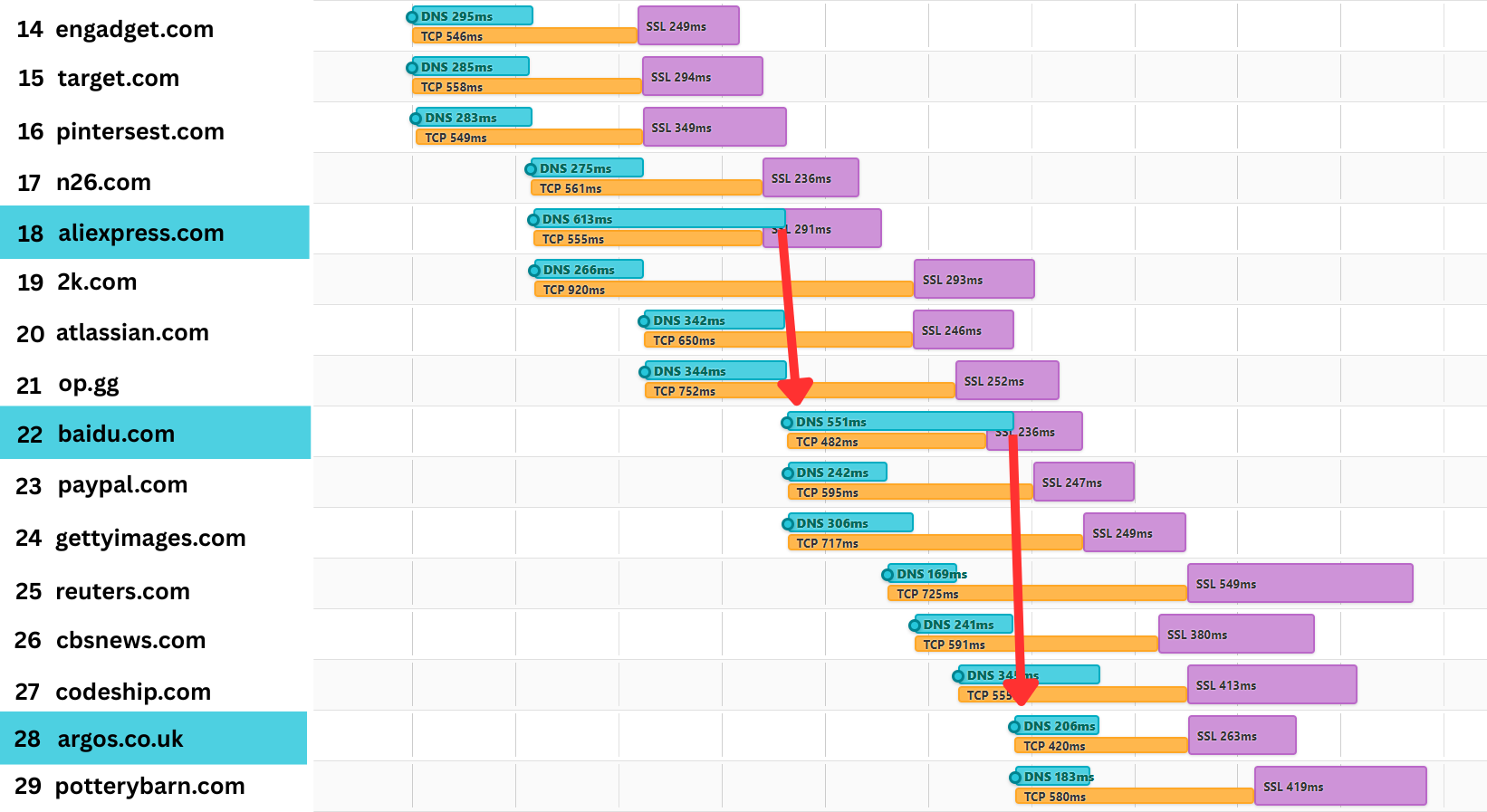
The main factor here is that Chrome's preconnect manager only processes up to three DNS lookups in parallel.
static const size_t kMaxInflightPreresolves = 3;
So even if a page has many preconnect hints, they won't all compete with other page resources at the same time.
Overusing preconnect hints can sometimes cause problems
We've seen that preconnect hints mostly don't slow down other resources on the page. However, there is another way that excessive preconnects can cause problems: an important connection might be queued up after a less important one!
For example, let's say you have a website with 9 preconnect hints used by third-party embeds. However, you also have a preconnect hint that's used to connect to the Content Delivery Network that's needed to load your hero image. By the time the preconnect hint is ready to be processed the image request may already have started anyway.
If you use many preconnects, make sure to put the most critical ones first.
How to detect excessive preconnect usage
Both Lighthouse and the DebugBear website speed test can validate preconnect and other resource hints on your page.
Lighthouse: More than 4 preconnect connections were found
Lighthouse shows preconnects found on the page as part of the Network Dependency Tree audit.
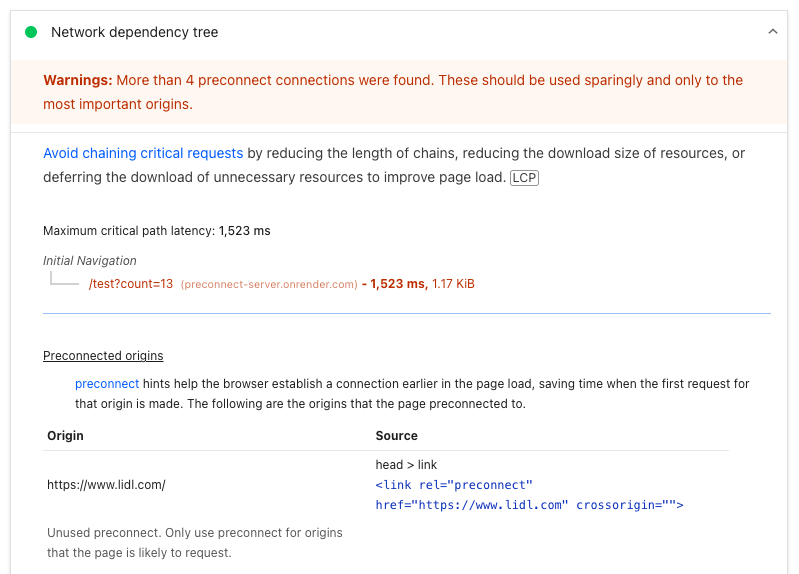
If more than 4 preconnects are found the following message is shown:
More than 4 preconnect connections were found. These should be used sparingly and only to the most important origins.
Lighthouse then lists all individual preconnect hints on the page and whether they were used.
Unused preconnect. Only use preconnect for origins that the page is likely to request.
Validate resource hints in DebugBear
In the DebugBear speed test, the "Ensure resource hints are valid" checks if preconnect and preload hints on your page are set up correctly.
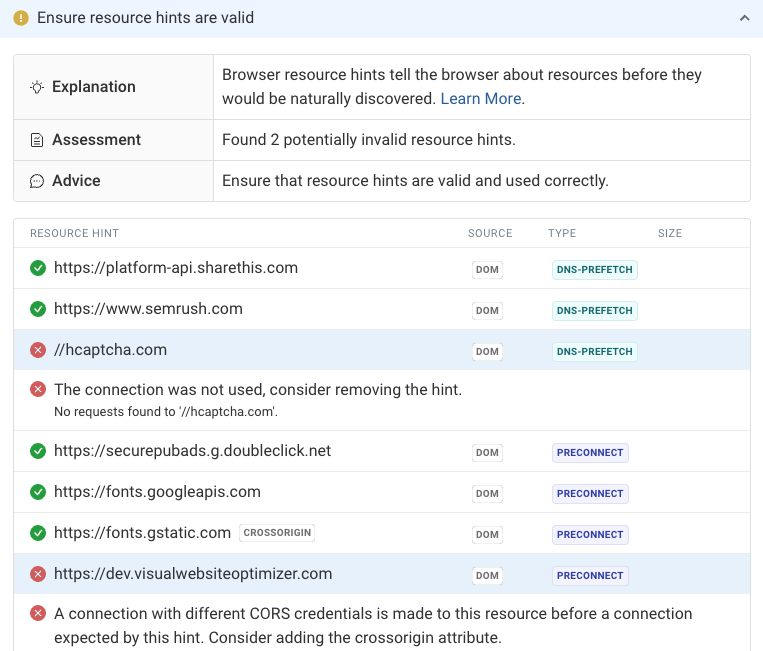
You can also use the resource hint validator as a standalone tool.
How to use preconnect hints effectively
When using preconnect, keep these best practices in mind:
- Be selective: Focus on the most critical origins—especially those required to load above-the-fold content—rather than connecting to every possible origin.
- Audit regularly: Review your preconnect list periodically to ensure you're not setting connections that are no longer necessary.
- Test your web performance: Measure whether the preconnects have a positive impact on your website, or if they are just getting in the way.
Keep an eye on your page speed
If you're trying to keep your website fast, DebugBear can monitor your website continuously and alert you to problems and optimizations. Get synthetic test reports, real user analytics, and Google CrUX data all in one place.
Sign up for a free 14-day trial and start monitoring your website today.
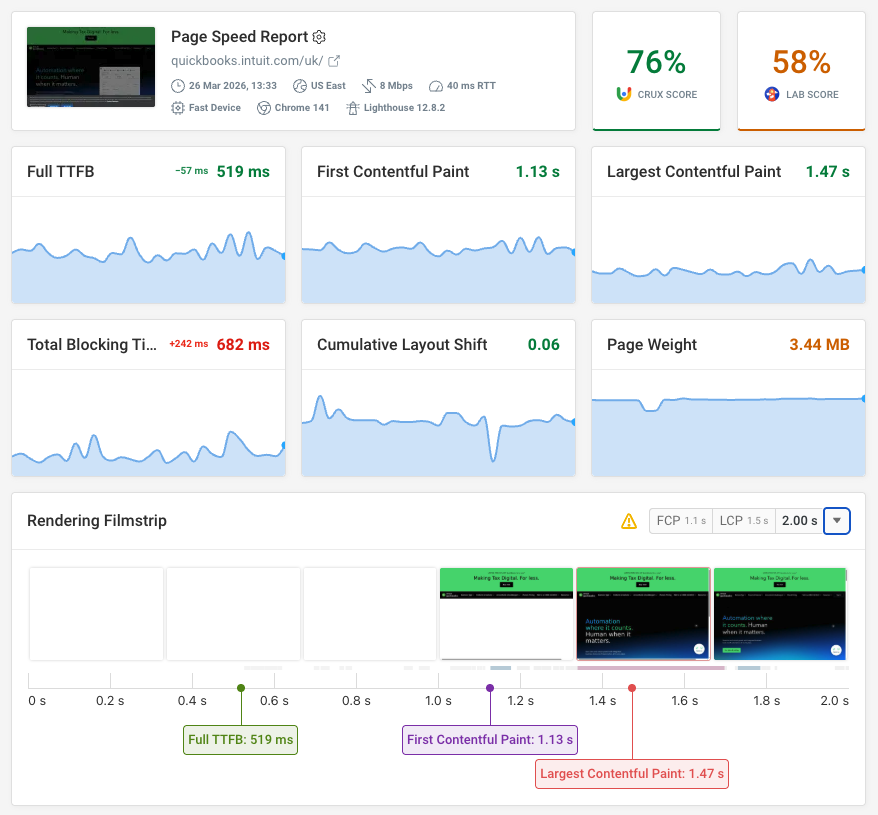


Monitor Page Speed & Core Web Vitals
DebugBear monitoring includes:
- In-depth Page Speed Reports
- Automated Recommendations
- Real User Analytics Data