
Server-side rendering (SSR) is a rendering strategy where the server generates the HTML markup for a page and sends it to the browser ready to display.
This leads to faster page load times and better loading performance compared to client-side rendering, where the browser needs to download and execute the application JavaScript before it can render meaningful content on the page. SSR also improves search engine indexability, since crawlers can parse pre-rendered HTML more reliably than JavaScript-rendered pages.
On the other hand, server-side rendering comes with tradeoffs as well, such as increased complexity, higher hosting costs, and potential issues with Interaction to Next Paint (INP) if not implemented carefully.
Client-Side Rendering: The Original SPA Architecture
Client-side rendering (CSR) was the original rendering approach for single-page applications (SPAs), emerging in the early 2010s with frameworks such as Backbone.js, AngularJS, and later React. The idea was to move rendering to the browser to enable faster interactions and page transitions without full round-trips to the server.
With CSR, the browser is responsible for generating the entire page from JavaScript. The server only delivers a minimal HTML file and a JavaScript bundle, which the browser executes:
<!DOCTYPE html>
<html lang="en">
  <head>
    <meta charset="UTF-8" />
    <title>Blank Screen on Start</title>
  </head>
  <body>
    <div id="root"><!-- empty --></div>
    <script src="/bundle.js"></script>
  </body>
</html>
Since the browser downloads and runs the entire JavaScript bundle before anything appears on the screen, the first page load is usually slow. Users see a blank screen or loading spinner for a fairly long time, leading to poorer user experience and higher bounce rates.
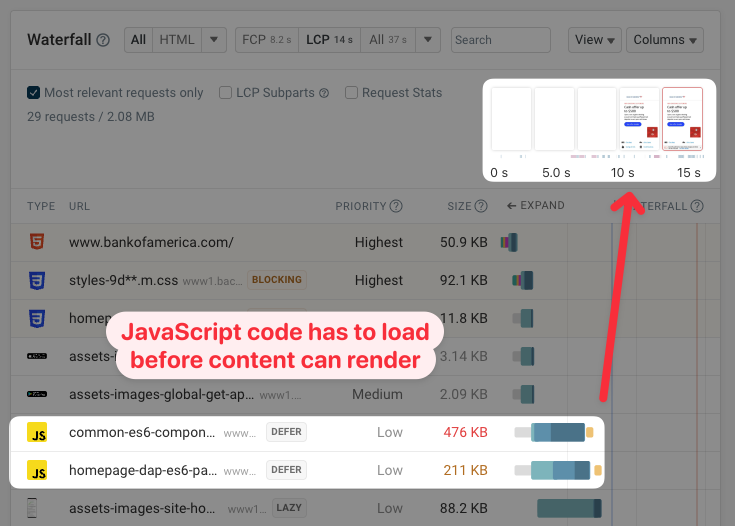
Here's an example of a client-side rendered website. This test result from a DebugBear website speed test shows that no content is visible until two JavaScript files have loaded and have been run by the browser:
Server-side rendering provides a solution to this problem.
What Is Server-Side Rendering (SSR)?
Server-side rendering generates the page's HTML on the server before sending it to the browser. This requires a server-side runtime such as Node.js to execute the application code and produce the HTML.
Here's an example of an HTML page the browser receives with server-side rendering. All HTML elements inside the root element are rendered on the server:
<!DOCTYPE html>
<html lang="en">
  <head>
    <meta charset="UTF-8" />
    <title>Weekly Newsletter</title>
  </head>
  <body>
    <div id="root">
      <div class="container">
        <h2>Stay Updated</h2>
        <form method="post">
          <input
            type="email"
            name="email"
            placeholder="Enter your email"
            required
          />
          <button type="submit">Subscribe</button>
        </form>
      </div>
    </div>
    <script src="/bundle.js"></script>
  </body>
</html>
Since the browser receives ready-to-display HTML, static content appears on the page faster with server-side rendering. However, the browser may still need to download and execute some JavaScript to add interactivity to the HTML elements (a.k.a. hydrate the page). When this happens, users will need to wait longer before they can interact with the app.
Essentially, SSR gets content in front of users faster, but there's a longer gap before that content becomes interactive.
Steps of Server-Side Rendering
In brief, server-side rendering consists of the following steps:
- Client's HTTP request – When the user enters the URL in the browser's address bar, the browser establishes an HTTP connection with the server, and sends a request for the HTML file.
- Data fetching – The server fetches any required data from the database or third-party APIs.
- Server-side pre-rendering – The server executes the application code and generates the page's HTML.
- Server's HTTP response – The server sends the HTML to the client.
- Page load and rendering– The client downloads the HTML file and displays the page content.
- Hydration – The client downloads the JavaScript file(s) embedded into the HTML, processes the code, and attaches event listeners to the components.
Implementing Server-Side Rendering
Server-side rendering can be implemented in multiple ways, from JavaScript frameworks to native web APIs.
Today, the most common approach is using a JavaScript framework with built-in support for server-side rendering:
- Next.js is the most widely used full-stack React framework, using React Server Components (RSCs) to run individual components exclusively on the server, reducing the JavaScript sent to the browser.
- Nuxt is a full-stack Vue framework powered by the open-source Nitro server engine that supports multiple server environments (Node.js, Deno, Bun, Cloudflare Workers, AWS Lambda, etc.).
- Angular lets you add SSR to your app by running the
ng add @angular/ssrcommand. - Astro defaults to static site generation (SSG) but supports SSR on a per-route basis, and works with React, Vue, Svelte, and Web Components.
If you don't want to use a framework, the web platform also has its own SSR solution called Declarative Shadow DOM (DSD). Originally, Web Components could only be rendered via JavaScript on the client. DSD solves this issue by allowing you to send fully rendered Web Components to the browser. Since DSD is now Baseline across all major browsers, you can use it in production without a polyfill.
You can further enhance an SSR app by layering on modern web platform features. For example, combining Speculation Rules and the View Transitions API can add instant page loads and smooth transitions between page navigations — all without a JavaScript framework.
Modern SSR frameworks (e.g., Next.js, Nuxt, and Astro) and the web platform (via the Streams API) support HTML streaming, which means the server can start sending HTML to the browser before it has finished rendering the full page (rather than waiting for all data to be fetched first). The result is faster Time To First Byte (TTFB) and better perceived performance for complex or data-heavy pages.
Pros of Server-Side Rendering
Server-side rendering can speed up your application and make it easier for search engines to index, but the gains vary depending on your use case. You can use our free site speed testing tool to measure its impact on your website.
Better Search Engine and AI Crawler Indexability
While search engine bots can easily crawl pre-rendered HTML (provided by SSR), they struggle with JavaScript-rendered content (provided by CSR) to varying degrees:
- Google can index JavaScript but requires an additional rendering step that can introduce delays, so even its own documentation recommends server-side rendering.
- Bing has more limited JavaScript support, which also affects DuckDuckGo, Yahoo, Ecosia, and You.com since they rely on Bing for a significant part of their results.
- Baidu, the dominant search engine in China, has very limited JavaScript support, so meaningful content needs to be in the raw HTML to be indexed reliably.
Beyond search engines, most AI crawlers, including GPTBot, ClaudeBot, and PerplexityBot, can't render JavaScript, either. As a result, any content that appears after JavaScript executes is completely invisible to AI systems, which has negative implications for GEO (Generative Engine Optimization).
The same applies to social media crawlers. Platforms such as Facebook and X use server-rendered HTML to generate link previews. If your Open Graph meta tags are added via JavaScript, social shares will show a bare link instead of a rich preview with a title, description, and image, which significantly reduces engagement.
All in all, if you want your content indexed reliably across the entire search landscape, server-side rendering is the better option.
Faster Initial Page Loads
Since the HTML is already generated by the time it reaches the browser, users see content faster compared to client-side rendering. Even with browser caching, which eliminates the download step, a CSR app still needs to parse and execute the JavaScript bundle on every page load.
Faster Largest Contentful Paint (LCP)
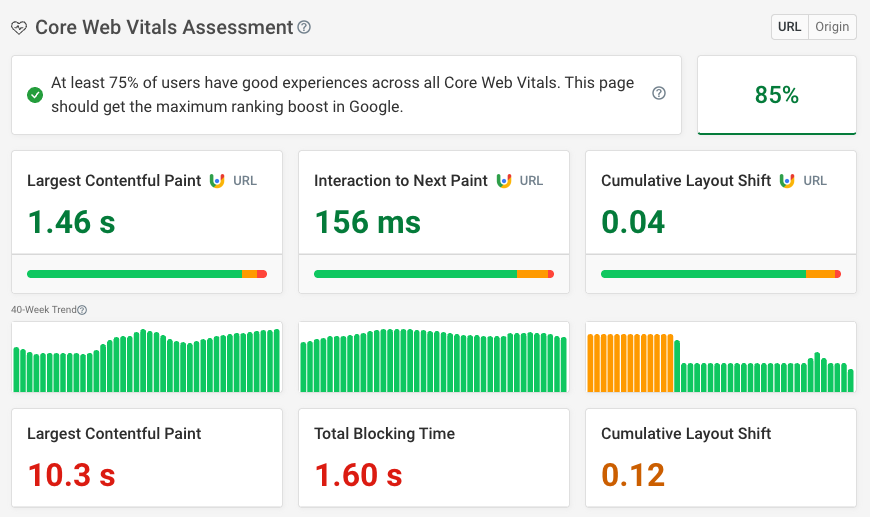
Largest Contentful Paint is one of Google's three Core Web Vitals and, therefore, a search ranking factor. Since the LCP element (i.e., the largest image or text block on the page) is part of the pre-rendered HTML the server sends, the browser can display it sooner than with CSR, where it needs to wait for the JavaScript to execute.
Lower Cumulative Layout Shift (CLS)
Cumulative Layout Shift, also included in Core Web Vitals, measures unexpected changes in the position of your content elements after the page first renders. With server-side rendering, the browser receives fully rendered HTML upfront, which typically results in fewer layout shifts and better CLS scores.
Better for Accessibility
Assistive technologies such as screen readers work more reliably with SSR apps. With JavaScript-generated content, elements may be injected into the DOM after the screen reader has already parsed the page, causing them to be missed or announced out of order. This is also why SSR is a frequent recommendation for SPA accessibility.
SSR apps also tend to perform better on low-end devices, which is important for accessibility because users who rely on assistive technologies are more likely to be on older or less powerful hardware.
If you'd like to learn now how to set up and optimize server-side rendering for your application, check out these in-depth guides, too:
Cons of Server-Side Rendering
While server-side rendering has many advantages, there are still some cases when SSR might not be worth the effort.
Increased Complexity
SSR increases complexity since you'll need to set up and maintain a server environment, manage more complicated dependency and caching configurations, find developers with the right skill set, etc. This more complex architecture will generally be more expensive, harder to maintain and debug, and more prone to errors than a plain CSR application.
Potentially Higher Interaction to Next Paint (INP)
Interaction to Next Paint, the third Core Web Vital, measures the delay between a user action and the browser's response.
With server-side rendering, the browser displays static content faster (which leads to better LCP), but it still needs time to hydrate the application. As a result, the app may look ready for interaction while the code is still being processed in the background. If the user tries to interact with the page during this period, there could be a delay in the browser's response.
A poor INP score depends on many factors, including your app's complexity, the number of interactive elements, page weight, and others. For many SSR apps, INP won't be an issue. However, if you experience poor INP scores, you still don't need to give up on server-side rendering, as there are ways to mitigate it.
For example, your UI can indicate to users that the app is not yet ready for input (e.g., you can hide or disable the buttons) so that they won't try to interact with it too early, or you can break up rendering into smaller chunks to avoid long-running blocking tasks.
In our article about INP misconceptions, you can learn more about fixing slow INP scores during page load.
Less Efficient Caching
With client-side rendering, the initial HTML shell is identical for all users, so it can be easily cached on a CDN (Content Delivery Network) alongside the JavaScript bundle.
With server-side rendering, the HTML is different for each page and often per user, making CDN caching harder to implement. Users who load a page that hasn't been cached will experience a longer initial load time. Edge deployments (e.g., Cloudflare Workers or Vercel Edge Functions) can partially address this by moving rendering closer to the user, but caching strategy still requires more deliberate planning than with CSR.
Compatibility Issues
Some third-party libraries and tools aren't compatible with server-side rendering. This issue is less common than it used to be, but worth keeping in mind when choosing your dependencies.
Higher Running Costs
As client-side apps don't need a server, you can deploy them to a free or cheap static hosting service such as Cloudflare Pages or GitHub Pages. However, you'll need to pay for a server or at least a serverless backend to deploy an SSR application, which means higher running costs.
Larger HTML Size
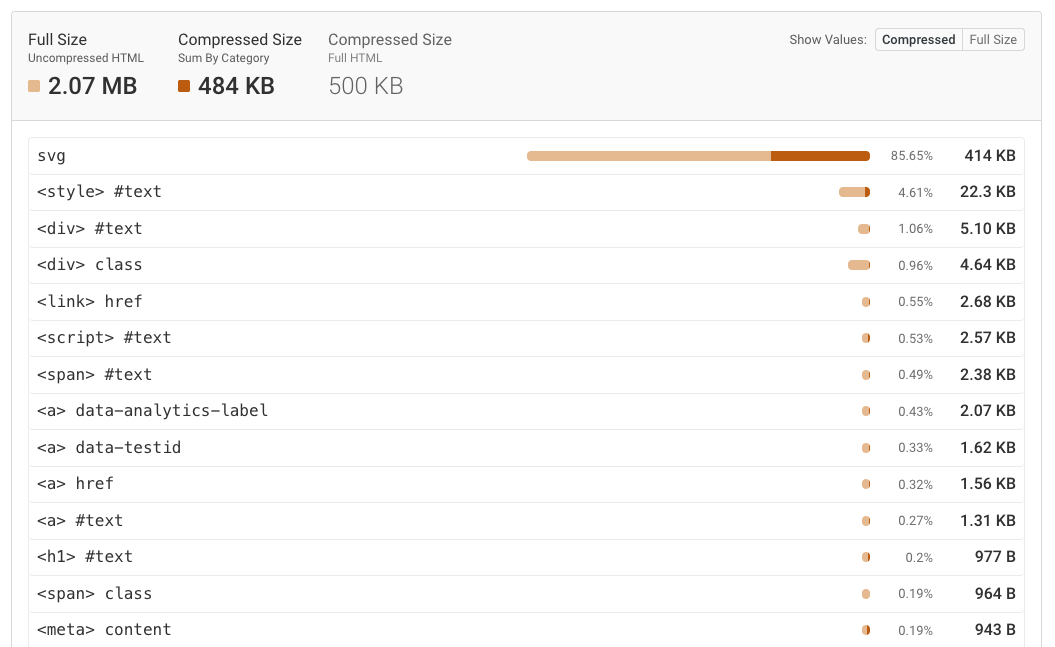
SSR apps come with a larger HTML size because of the embedded hydration state. On some websites, large hydration state can have a significant performance impact.
This is not really an argument against SSR, just something to keep in mind as a potential risk if it’s implemented poorly. You can test your app for HTML bloat and other issues with our free HTML size analyzer tool:
When Should You Use Server-Side Rendering?
Server-side rendering is the better option for most public-facing websites where performance, SEO, and accessibility matter. The tradeoffs (e.g., added complexity, higher costs, and potential INP issues) are generally worth it, and modern frameworks and native web platform features have significantly reduced the implementation burden.
If your app needs rich interactivity, you can still use SSR for the initial page load and then enhance the user experience with client-side JavaScript.
That said, SSR isn't always necessary. A purely internal tool, a heavily personalized app, or a simple low-traffic project may be fine with client-side rendering.
Monitor Performance to See the Impact of Server-Side Rendering
You can see how server-side rendering impacts your site speed by monitoring your performance metrics under different conditions.
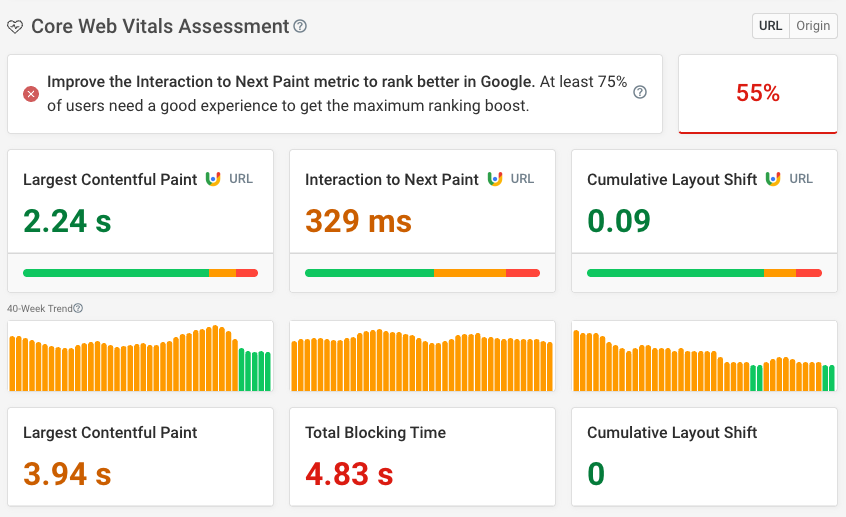
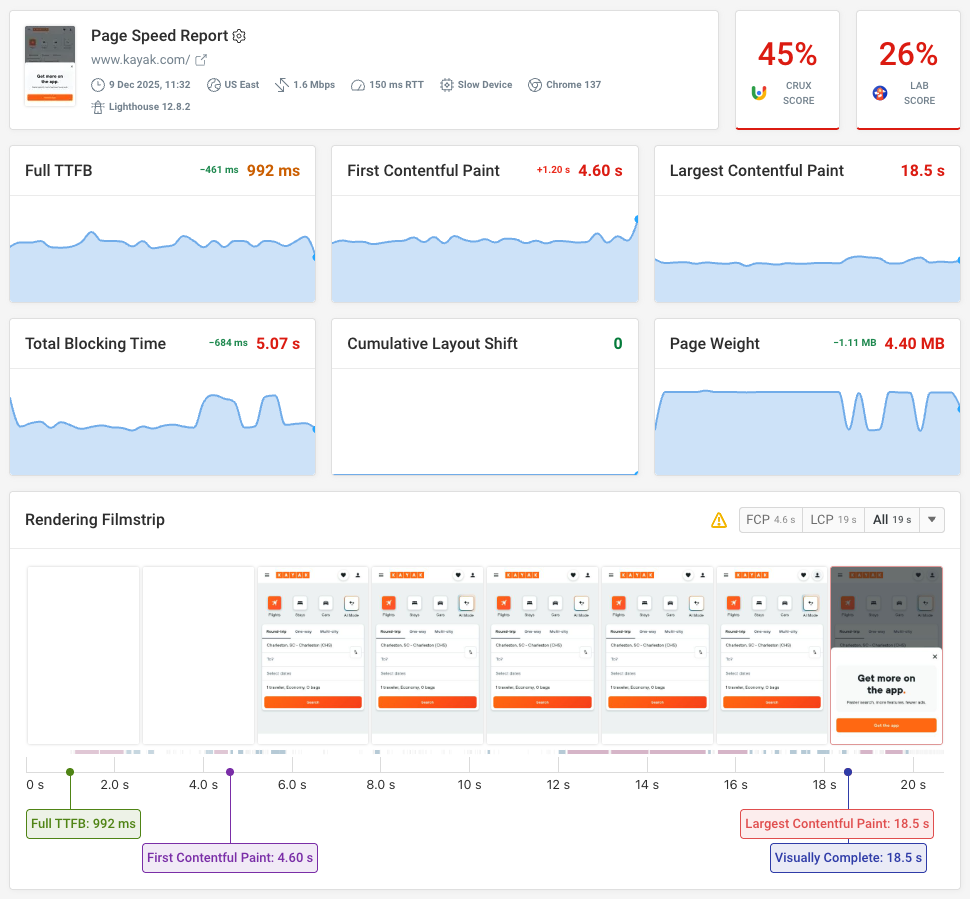
With DebugBear, you can gain insight into your detailed web performance data, compare it against your competitors' results, run synthetic tests from multiple locations around the world, and track the experience of your real users:
You also get access to custom performance recommendations, Lighthouse score monitoring, and web performance experiments that allow you to try out page speed optimizations quickly without deploying code changes:
Sign up for a 14-day free trial (no credit card required), and start measuring the real-world impact of server-side rendering on your site.


Monitor Page Speed & Core Web Vitals
DebugBear monitoring includes:
- In-depth Page Speed Reports
- Automated Recommendations
- Real User Analytics Data