JS File Size Alerts
JavaScript file size alerts notify you about significant bundle size changes based on scheduled synthetic tests. You'll be alerted when an existing file grows or shrinks, when a new script is added, or when a script is removed.
Unlike the lab test alerts, JS file size changes are reported per script URL instead of per page.
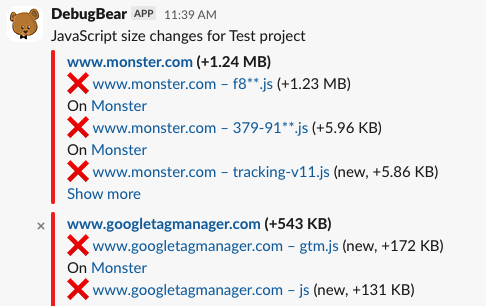
When are JS file size alerts sent?
An alert is sent when the size of a JavaScript file changes by more than the alert threshold compared to the previous test result. By default, the threshold is 450 bytes.
Changes are grouped by domain, so a single notification can include multiple files served from the same origin.
Set up JS file size notifications
You can receive JS File Size alerts by email, in Slack, or in Microsoft Teams.
To set up a new trigger:
- Open the Integrations tab in your project dashboard
- Click Add Notification Trigger
- Select the channel you want to send alerts to
- Choose JS File Size Changes as the trigger type
If you haven't connected a channel yet, follow the add a channel integration steps first.
Alert settings
Click the gear icon next to the JS File Size Changes trigger to open its settings.
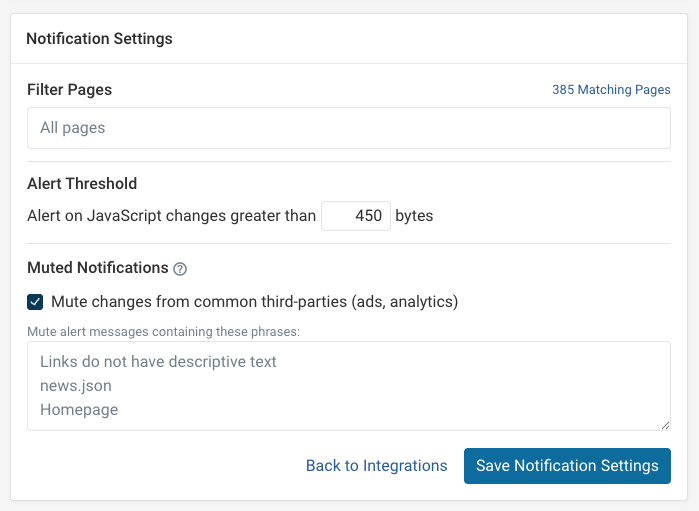
Size threshold
Set the minimum size change in bytes that triggers an alert. The default is 450 bytes.
Lowering the threshold increases the number of alerts you receive. Raising it filters out smaller changes.
Page filter
Restrict alerts to pages that match the filter string. Use [tag-name] to only alert on explicitly tagged pages.
This is useful when you only want to monitor a subset of pages in the project.
Muted notifications
Mute alerts for files whose URL contains a specific word or pattern. This is helpful for ignoring known noisy third-party scripts.
You can also enable mute common third parties to automatically suppress alerts for well-known third-party domains. See Muting Notifications for more detail.