Uptime Alerts
Uptime alerts tell you when an uptime monitor detects that your site is down, and again when it recovers.
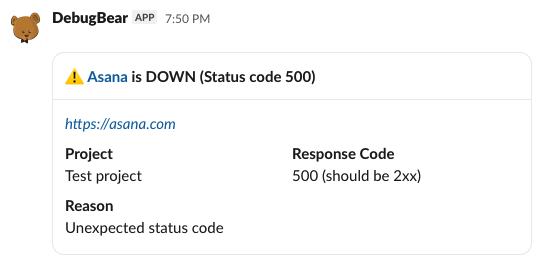
When are uptime alerts sent?
Alerts are sent immediately after an outage is detected. You can configure how many failed checks are required to trigger an outage.
You won't get another alert while the monitor stays down. When a check passes again the monitor sends a recovery alert.
Alert threshold
The threshold is configured per monitor, in the monitor's settings. There are four options:
- Alert immediately, the default, alerts on the first failed check
- After 3 failures
- After 5 failures
- Off, which disables alerting for that monitor
Waiting for three or five failures is useful for monitors that are checked frequently and occasionally see a one-off blip.
Confirming outages from a second region
Uptime checks are generally run from the US East region. When a check fails DebugBear runs it again from US Central before recording the outage, so a network problem affecting a single region doesn't show up as downtime on your site.
You can control this using the Confirm outages by checking again from a second region option in the monitor's settings.
Set up uptime notifications
Uptime alerts can be sent by email, in Slack, or in Microsoft Teams.
To set up a new trigger:
- Open the Integrations tab in your project dashboard
- Find the channel you want to send alerts to and click Add Trigger
- Choose Uptime Alerts as the trigger type
An uptime trigger has no settings of its own, so it has no gear icon. Which monitors alert, and after how many consecutive failures, is set in each monitor's Alerting section.
If you haven't connected a channel yet, follow the add a channel integration steps first.
Every channel with an Uptime Alerts trigger gets notified, so you can send alerts to more than one place.
Alert message details
The alert title names the monitor and its new status, and for a down alert adds a short summary of what went wrong, for example ⚠️ Checkout is DOWN (Status code 403).
The message body includes show details on the check status, including why the check failed.
These failure reasons are possible:
| Reason | Meaning |
|---|---|
| Request timed out | The server didn't respond in time |
| Request failed | A DNS, connection, or TLS error |
| Unexpected status code | The status code didn't match the expected value |
| Response too slow | The response was slower than the configured limit |
| Response content didn't match | The expected text wasn't in the response |
| Response header didn't match | The expected header wasn't returned |