API Build Alerts
Build alerts report the result of tests you trigger yourself (rather than being scheduled) and which have a commit hash attached to them.
For example, you can send out build alerts as part of your CI setup, or as part of a staging or production deployment.
What counts as a build
A test result is treated as a build when you provide a commit hash when triggering it, through the API, the CLI, or any script of your own.
From the CLI:
debugbear \
  --pageId=... \
  --commitHash=$GITHUB_SHA \
  --commitBranch=$GITHUB_REF_NAME
When you run the CLI inside CI it can usually work these values out for you with
--inferBuildInfo, so you don't need to pass them explicitly.
Or through the API:
debugbear.pages.analyze(pageId, {
  commitHash: "e2ba122",
  commitBranch: "add-support-for-tags",
  buildTitle: "Add support for tags",
});
When are build alerts sent?
The notification is sent once both the build and the result it's compared against have finished testing. That means you get one message with the complete comparison rather than a partial result.
Builds are compared against a baseline chosen from baseHash and baseBranch if you
provide them, and otherwise against the most recent scheduled test for the page. See
comparing test results.
What's in the notification
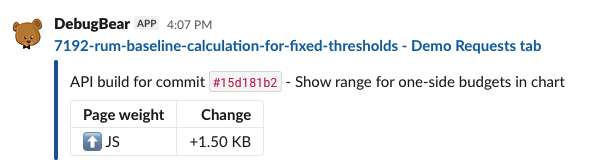
Each message is titled with the branch name (or the short commit hash) and the page name, and is colour coded by outcome:
- ✅ Success: no performance budgets were breached
- ⚠️ Failure: at least one budget was breached
- Neutral: no budgets are configured, so there's nothing to pass or fail
The message body includes, where there's something to report:
- Any performance budgets that were breached, with the threshold and the measured value
- Lighthouse category score changes
- Request size changes, grouped by resource type
- New console errors compared to the baseline
- The build title you supplied, if any
- A link to the full test result
Set up build notifications
You can receive build alerts by email, in Slack, or in Microsoft Teams.
- Open the Integrations tab in your project dashboard
- Click Add Notification Trigger
- Select the channel you want to send alerts to
- Choose API Builds as the trigger type
If you haven't connected a channel yet, follow the add a channel integration steps first.
You can also get build results outside a chat channel: the GitHub integration adds a check run to each pull request, and webhooks deliver the result to your own system.
Alert settings
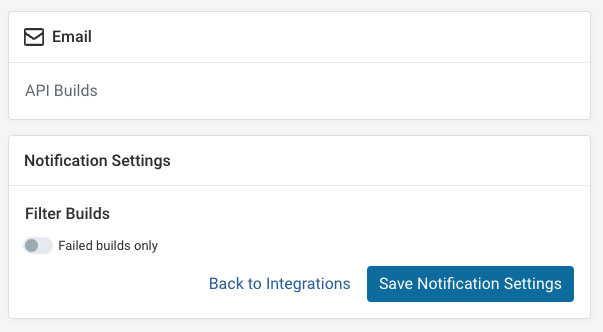
Click the gear icon next to the API Builds trigger to open its settings.
Failed builds only
Enable Failed builds only to receive a notification just for builds that breach a performance budget. Successful and neutral builds are skipped.
Because the filter depends on budgets, a project with no performance budgets configured will never produce a failed build, and so will never notify when this option is enabled.