Real User Monitoring Properties
This page lists all the page view properties that are available in DebugBear's Real User Monitoring (RUM) feature. Use the API ID for filtering and grouping when using the DebugBear API.
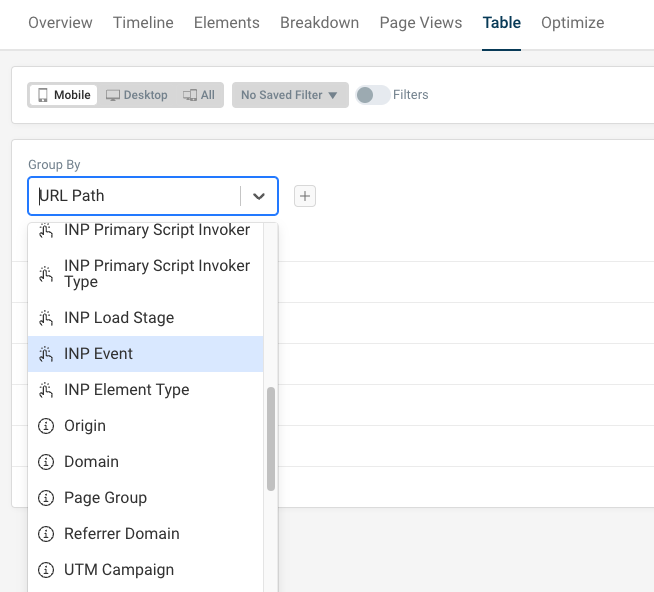
Available RUM properties
DebugBear RUM currently supports 52 different page view properties.
Auto Path
The URL path with numbers replaced by asterisks.
API ID: autoPath
URL Path
The full pathname component of the URL, for example /something/test.
API ID: urlPath
Path Level 1
The first level of the path. If the full path is /a/b/c, then this value would be a.
API ID: path1
Path Level 2
The second level of the path. If the full path is /a/b/c, then this value would be b.
API ID: path2
Path Level 3
The third level of the path. If the full path is /a/b/c, then this value would be c.
API ID: path3
Page Title
The contents of the HTML <title> tag from when the page was loaded.
API ID: pageTitle
LCP Text
The text content of the UI element that was responsible for the Largest Contentful Paint.
API ID: lcpText
LCP Selector
The CSS selector of the UI element that was responsible for the Largest Contentful Paint.
API ID: lcpSelector
LCP Type
The high level type of LCP element, for example text or an image.
API ID: lcpType
LCP Image URL
The URL of the LCP element if it is an image, background image, or video element.
API ID: lcpUrl
CLS Text
The text content of the UI element that experienced the largest layout shift on the page.
API ID: clsText
CLS Selector
The CSS selector of the UI element that experienced the largest layout shift on the page.
API ID: clsSelector
CLS URL Path
The URL path where the largest layout shift occurred. For traditional websites this will be the same as the page URL.
This property is especially useful for single page applications with soft navigations after the page is opened.
API ID: clsPath
INP Text
The text content of the UI component that triggered the INP interaction.
API ID: inpText
INP Selector
The CSS selector of the UI element that triggered the INP interaction.
API ID: inpSelector
INP URL Path
The page where the INP interaction occurred. For multi-page websites this will be the same as the initial page URL.
If you have a single-page application, this property lets you see where the visitor navigated to before the interaction.
API ID: inpPath
INP Primary Script
The URL of the script with the single largest contribution to the overall INP score.
API ID: inpPrimaryScript
INP Primary Script Domain
The domain name of the script with the single largest contribution to the overall INP score. More details.
API ID: inpPrimaryScriptDomain
INP Primary Script Function
The name of the function that ran as part of an INP interaction and caused the longest delay. More details.
API ID: inpPrimaryScriptFunction
INP Primary Script Invoker
The script invoker explains what triggered the INP primary script to run. For example, the initial evaluation of the script, an event listener, or a scheduled timeout.
The INP script is the script that contributed most to the overall INP interaction delay. More details.
API ID: inpPrimaryScriptInvoker
INP Primary Script Invoker Type
The script invoker explains why a script was running at a given time. For example, a script might run because it just loaded, because of an event listener, or because of a scheduled setTimeout callback. More details.
API ID: inpPrimaryScriptInvokerType
LCP Script
The URL of the longest scripting task that ran before the LCP milestone.
API ID: lcpScript
LCP Script Domain
The domain name of the longest scripting task that ran before the LCP milestone.
API ID: lcpScriptDomain
INP Load Stage
Load stage that the INP interaction occurred in. This helps you diagnose whether interaction delays are caused by code running as part as the initial application load or by background tasks and event processing later on. More details.
API ID: inpLoadStage
INP Event Type
Whether the INP interaction was a pointer interaction or a keyboard interaction. Pointer interactions include both mouse and touch interactions.
API ID: inpEvent
INP Element Type
The high level type of INP element, for example a button or image.
API ID: inpType
Origin
The origin of the page the visitor accessed, for example https://www.example.com.
API ID: origin
Domain
The domain name of the page view, for example www.example.com.
API ID: domain
Page Group
The page group that the page view was assigned to based on the groups configured for your RUM snippet. More details.
API ID: groupId
Referrer Domain
The domain that the visitor came from.
API ID: referrerDomain
UTM Campaign
The value of the UTM Campaign query parameter for the page view.
API ID: utmCampaign
Browser
The browser that the visitor used, for example Chrome or Safari.
API ID: browser
Navigation Type
What triggered the page to open, for example a page refresh or a back/forward navigation. More details.
API ID: navigationType
BFCache Not Restored Reason
The reason why the page was not restored from the back/forward cache.
API ID: notRestoredReason
Operating System
The operating system of the visitor's device.
API ID: os
Device Memory GB
User device memory estimate reported by the browser. 8 GB is the maximum value that can be reported.
API ID: memory
Device CPU Count
Rough number of CPUs on the visitor's device.
API ID: cpu
Last Blocking Request
URL of the last render-blocking request that prevents page content from showing up. More details.
API ID: lastBlockingRequest
Country
The country of the visitor based on their IP address.
API ID: country
Network Type
Network type estimate that the browser provides through the Network Information API. 4G is the fastest speed that can be reported through this API.
API ID: networkType
Device Type
Whether the visitor accessed the website from a mobile or desktop device.
API ID: device
First Error Message
Message of the earliest error that occurred on the page.
API ID: firstErrorMessage
First Error Function Name
JavaScript function of the earliest error that occurred on the page.
API ID: firstErrorFunctionName
First Error Script URL
URL of the earliest error that occurred on the page.
API ID: firstErrorFilename
HTTP Version
The version of the HTTP protocol used to load the HTML document on the page.
Note that servers can't usually use HTTP/3 for the initial load of the page, but only once the browser has confirmed that it supports H3.
API ID: httpVersion
Tag 1
A custom page tag reported by the website. More details.
API ID: tag1
Tag 2
A custom page tag reported by the website. More details.
API ID: tag2
Tag 3
A custom page tag reported by the website. More details.
API ID: tag3
Tag 4
A custom page tag reported by the website. More details.
API ID: tag4
Tag 5
A custom page tag reported by the website. More details.
API ID: tag5
View Type
Whether the visitor is loading the site for the first time or returning. Determined by checking the referrer domain and whether cached resources are present.
If you have SPA mode enabled, this property also identifies page views that were recorded for a soft navigation. Filter on View Type Is Not Soft Navigation to look at initial page loads only.
API ID: viewType